PokéIndex™
Global Prices. In One Card.
The World's most powerful Pokémon pricing tool

The Global Pokémon Price Index

Pokémon cards now mirror real-world financial assets. PokéIndex gives investors, collectors and enthusiasts transparent, reliable pricing — and the tools to understand a market that has matured into a true asset class.

Loading
Overview
How it is moving
Portfolio value over time
Every card you own, re-priced every night
Allocation by folder
Share of total value
Total portfolio P&L over time
Value of everything you own, less what it cost you
Your movers
The five biggest risers and fallers you hold
Portfolio vs the market
Your cards against every card we track
Where the value sits
Value by era
Where your money sits in the timeline
Raw vs graded
Every grade you hold, by value
Value by set
Your ten biggest sets — click one to see just those cards
Your ten biggest folders
Value now, folder by folder
Ten most valuable cards
Value now × how many you hold
What you have spent
Money in, month by month
What you put in each month — cards and costs together
Cost vs value by era
What each era cost you, against what it is worth now
P&L by folder
Best to worst, on what each folder cost you
Your cards
P&L over
Realised profit stays in your P&L for good.
Price alerts
Watch any card at any grade and hear about it the moment it moves.
What powers PokéIndex
We aggregate data from multiple live sources so you get the most complete picture of any card's value.
—
Live Data Feeds
—
Cards Tracked
—
Sets Tracked
7
Grading Companies
8
Auction Houses
🇬🇧 🇺🇸 🇪🇺 🇯🇵
Markets Covered
Want to request a new data source?
We're always adding new feeds. If you know of a market or source we're missing, let us know.
📊 Market Stats
Set value trends, price movers and market overview.
Index figures, calculations and charts © PokéIndex — please credit PokéIndex when sharing.
On this page
🏦 PokéIndex Market Index
The total value of the whole market (every tracked card added together) — the headline barometer for Pokémon cards.
—
Range: Region: Grade:
Total tracked value — rises with both price gains and more cards entering the dataset. For pure price performance, see the Price Index below.
📈 Price Index · constant basket
The market's true price performance — a fixed basket of cards (none added over time), indexed to 100. This is the "did prices actually go up" number, stripped of dataset growth.
—
Range: Region: Grade:
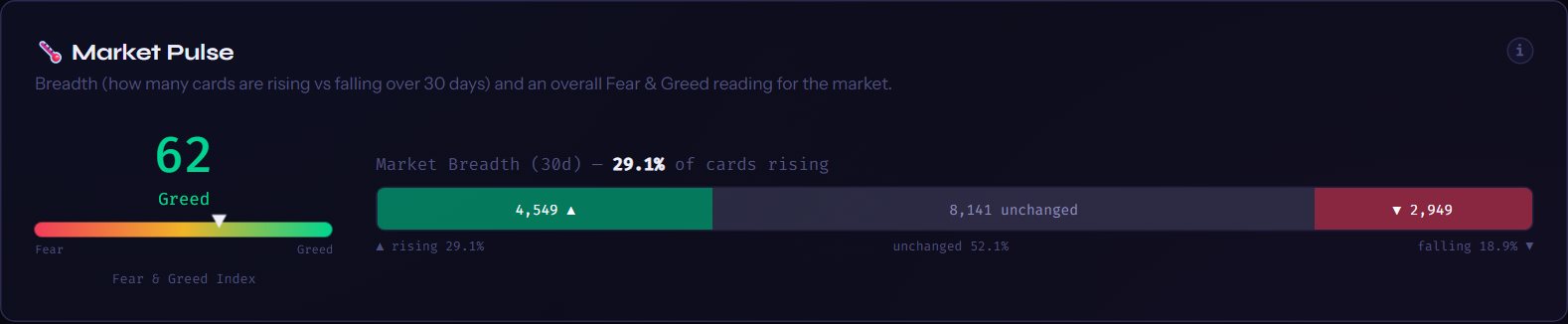
🌡️ Market Pulse
Breadth (how many cards are rising vs falling over 30 days) and an overall Fear & Greed reading for the market.
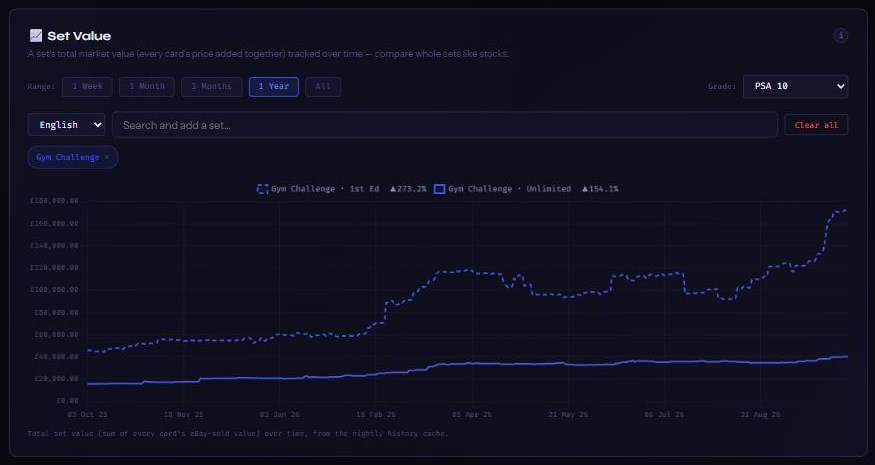
📈 Set Value
A set's total market value (every card's price added together) tracked over time — compare whole sets like stocks.
Range: Grade: Scale:
Show:
Total set value (sum of every card's eBay-sold value) over time, from the nightly history cache.
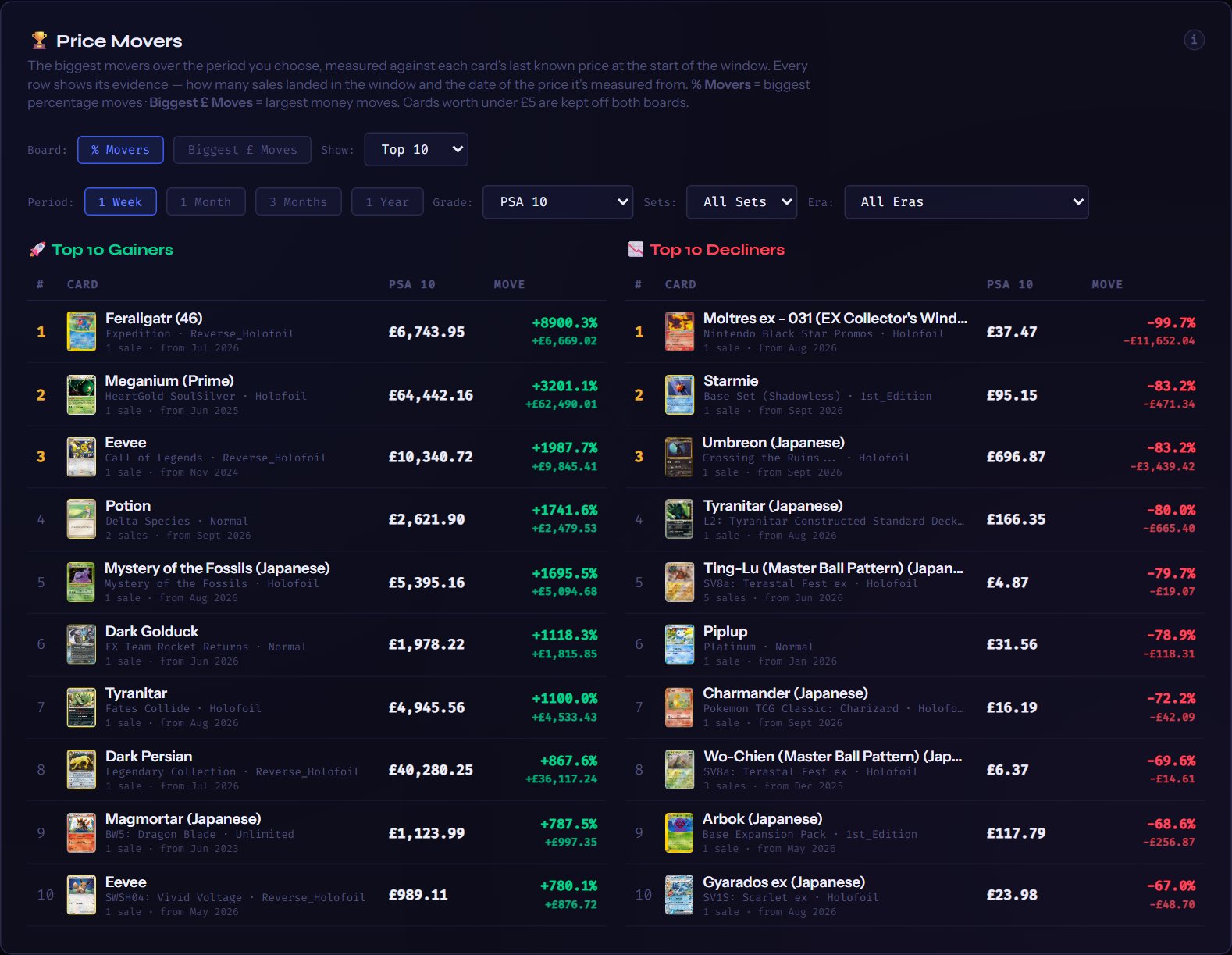
🏆 Price Movers
The biggest movers over the period you choose, measured against each card's last known price at the start of the window. Every row shows its evidence — how many sales landed in the window and the date of the price it's measured from. % Movers = biggest percentage moves · Biggest £ Moves = largest money moves. Cards worth under £5 are kept off both boards.
Board: Show:
Period: Grade: Sets: Era:
🚀 Top Gainers
Loading…
📉 Top Decliners
Loading…
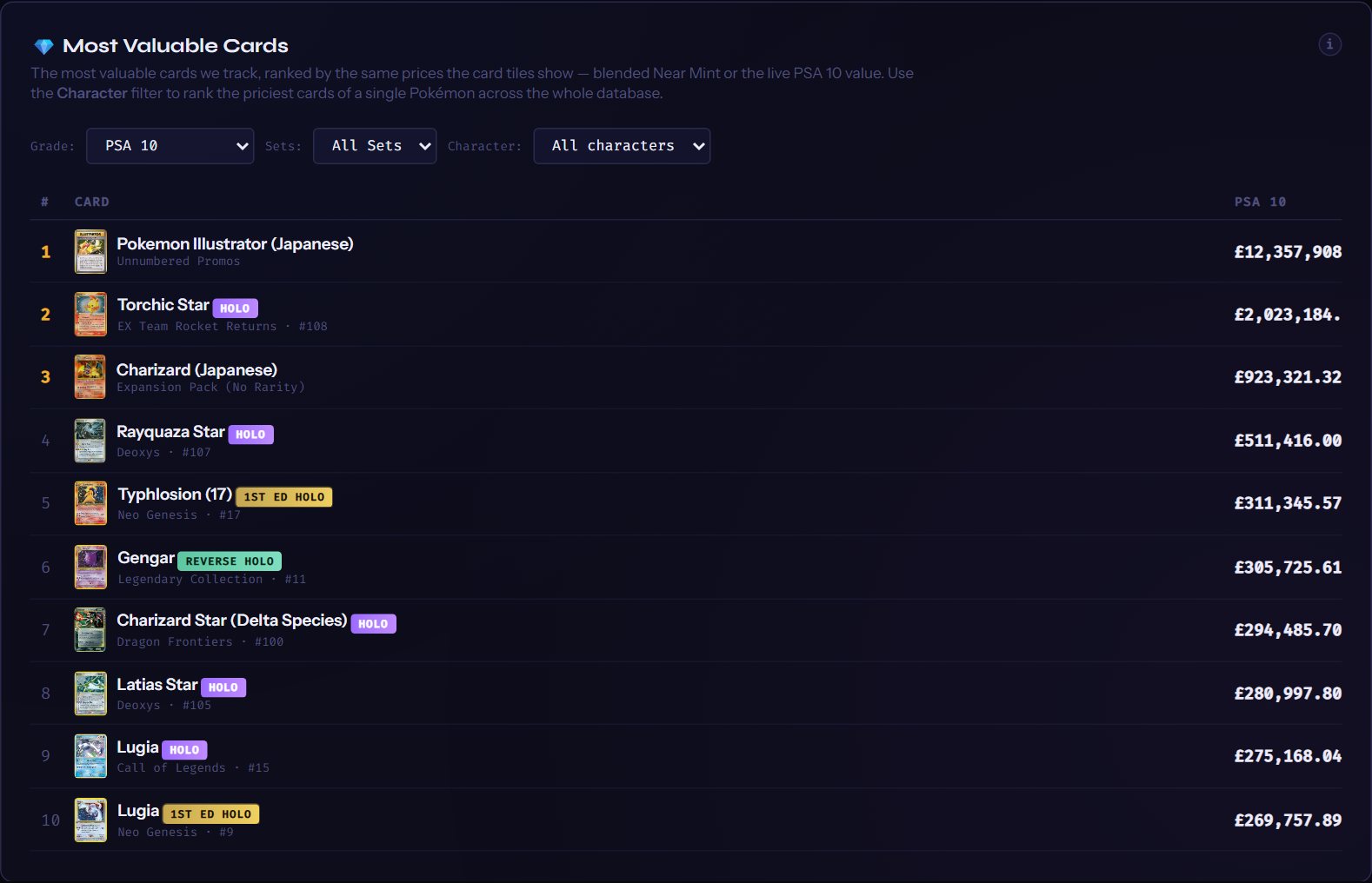
💎 Most Valuable Cards
The most valuable cards we track, ranked by the same prices the card tiles show — blended Near Mint or the live PSA 10 value. Use the Character filter to rank the priciest cards of a single Pokémon across the whole database.
Grade: Sets: Character: Show:
Loading…
📈 Grading ROI
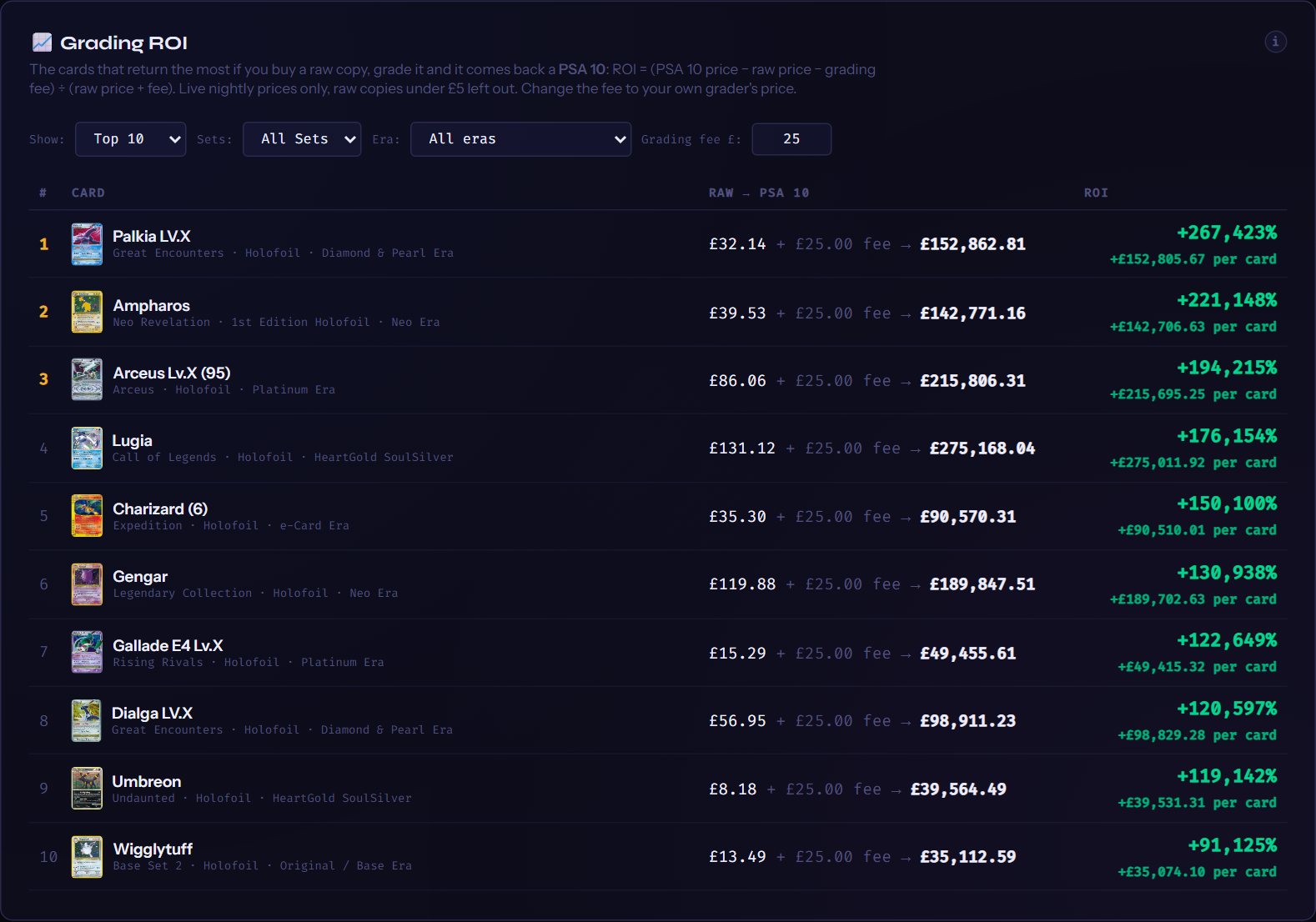
The cards that return the most if you buy a raw copy, grade it and it comes back a PSA 10: ROI = (PSA 10 price − raw price − grading fee) ÷ (raw price + fee). Live nightly prices only, raw copies under £5 left out. Change the fee to your own grader's price.
Show: Sets: Era: Grading fee £:
Loading…
🔨 Auction Houses
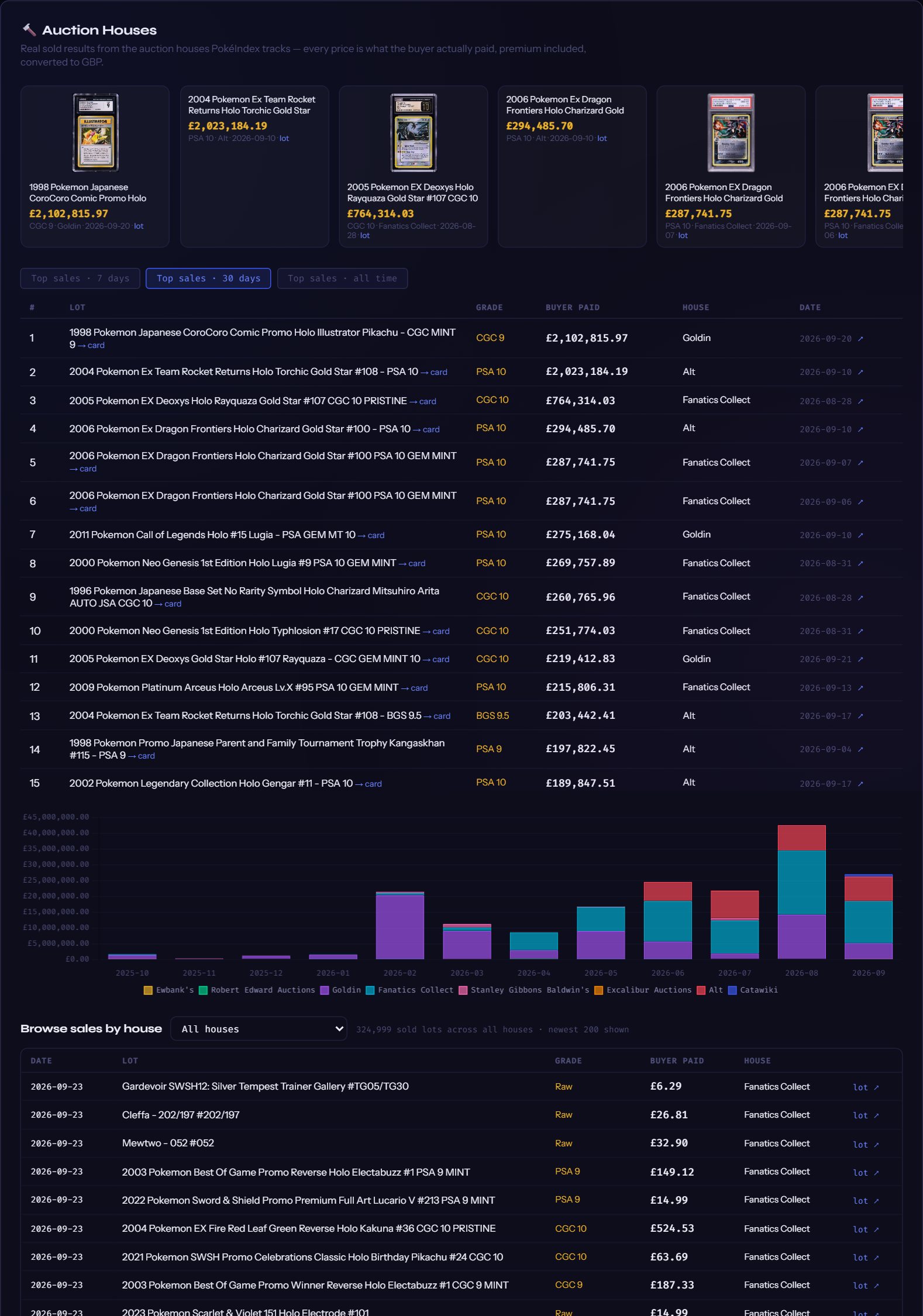
Real sold results from the auction houses PokéIndex tracks — every price is what the buyer actually paid, premium included, converted to GBP.
Browse sales by house
📊 Era ETFs
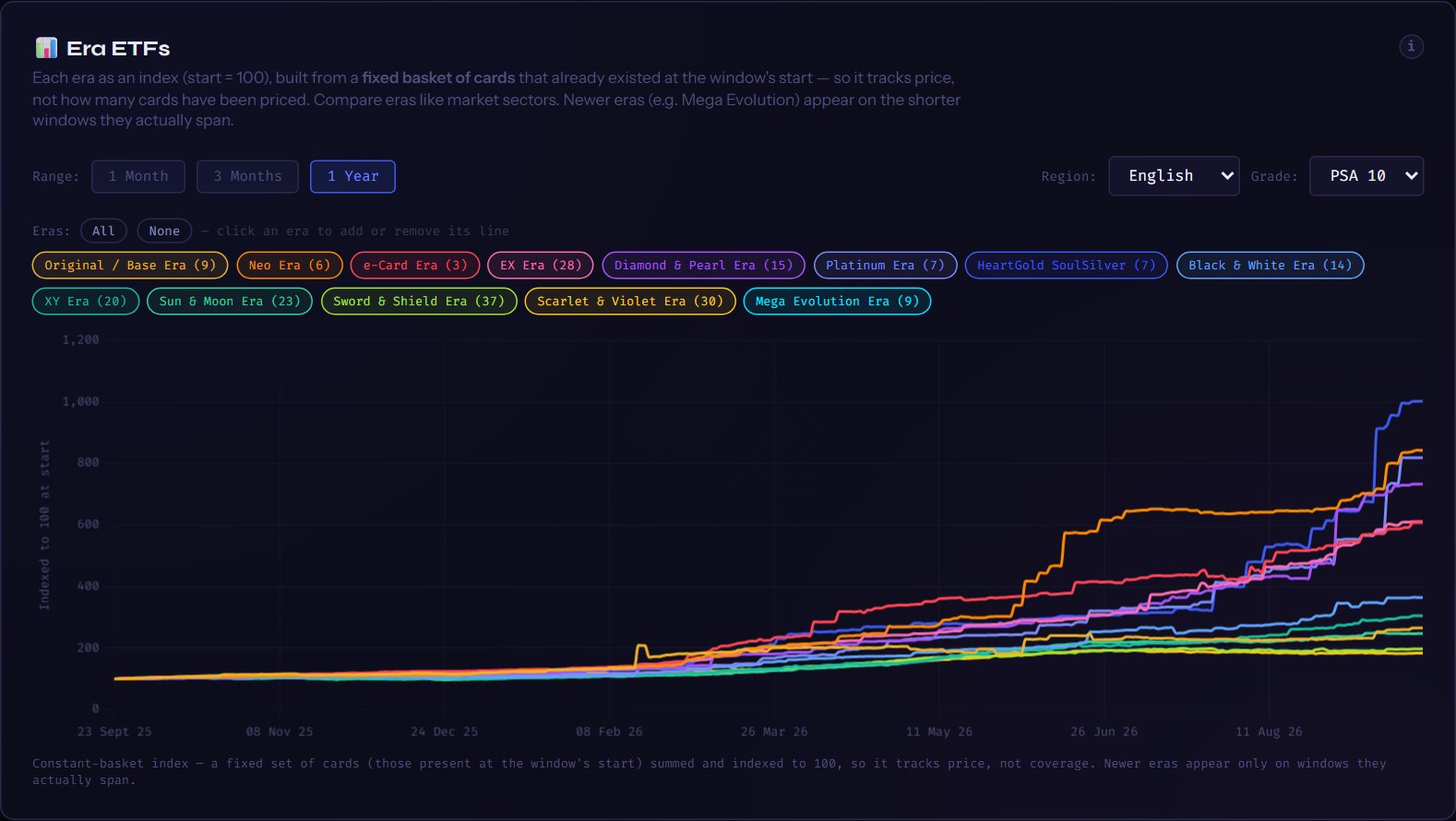
Each era as an index (start = 100), built from a fixed basket of cards that already existed at the window's start — so it tracks price, not how many cards have been priced. Compare eras like market sectors. Newer eras (e.g. Mega Evolution) appear on the shorter windows they actually span.
Range: Region: Grade:
Eras: AllNone— click an era to add or remove its line
Constant-basket index — a fixed set of cards (those present at the window's start) summed and indexed to 100, so it tracks price, not coverage. Newer eras appear only on windows they actually span.
📐 52-Week Distance
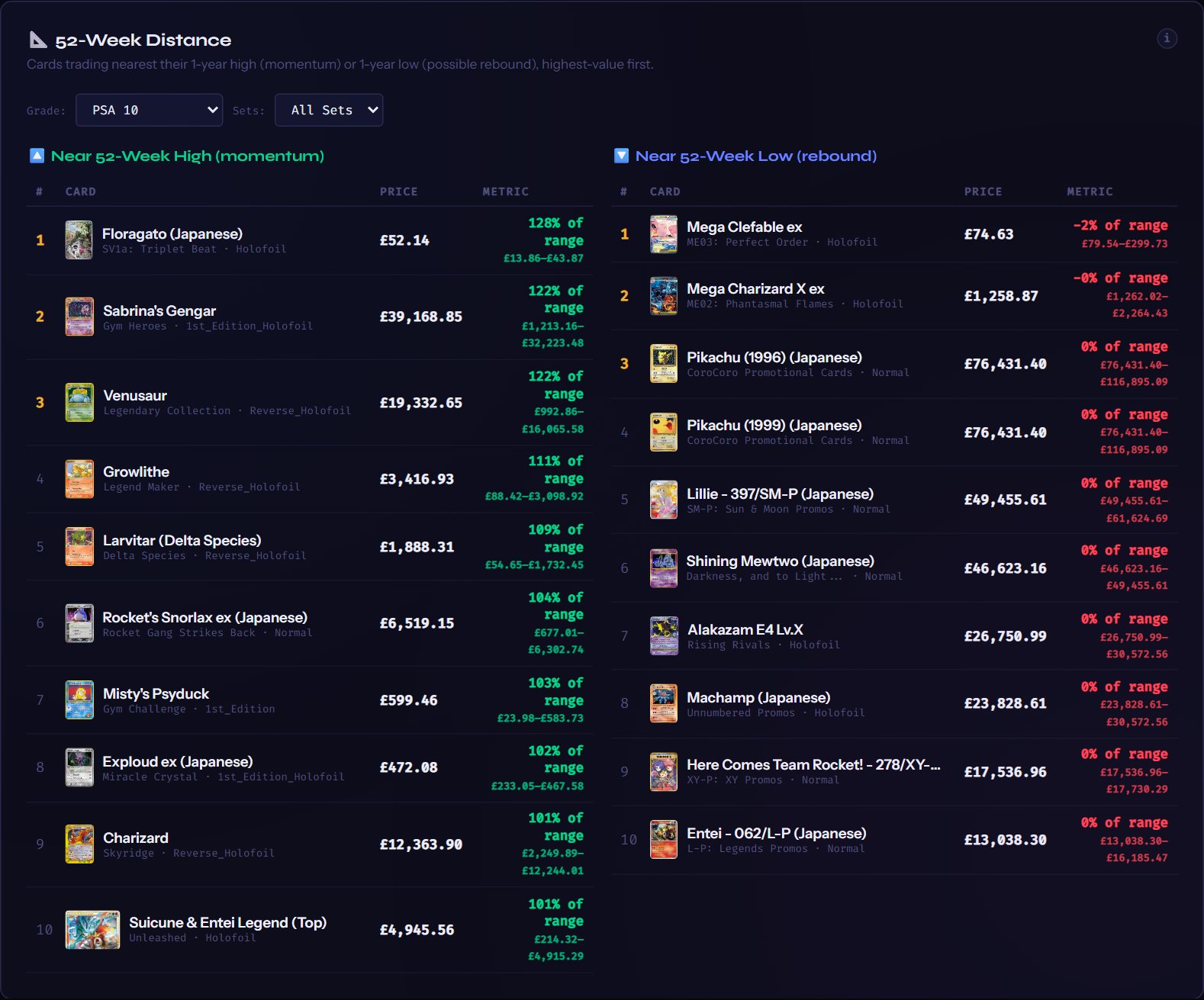
Cards trading nearest their 1-year high (momentum) or 1-year low (possible rebound), highest-value first.
Grade: Sets:
🔼 Near 52-Week High (momentum)
Loading…
🔽 Near 52-Week Low (rebound)
Loading…
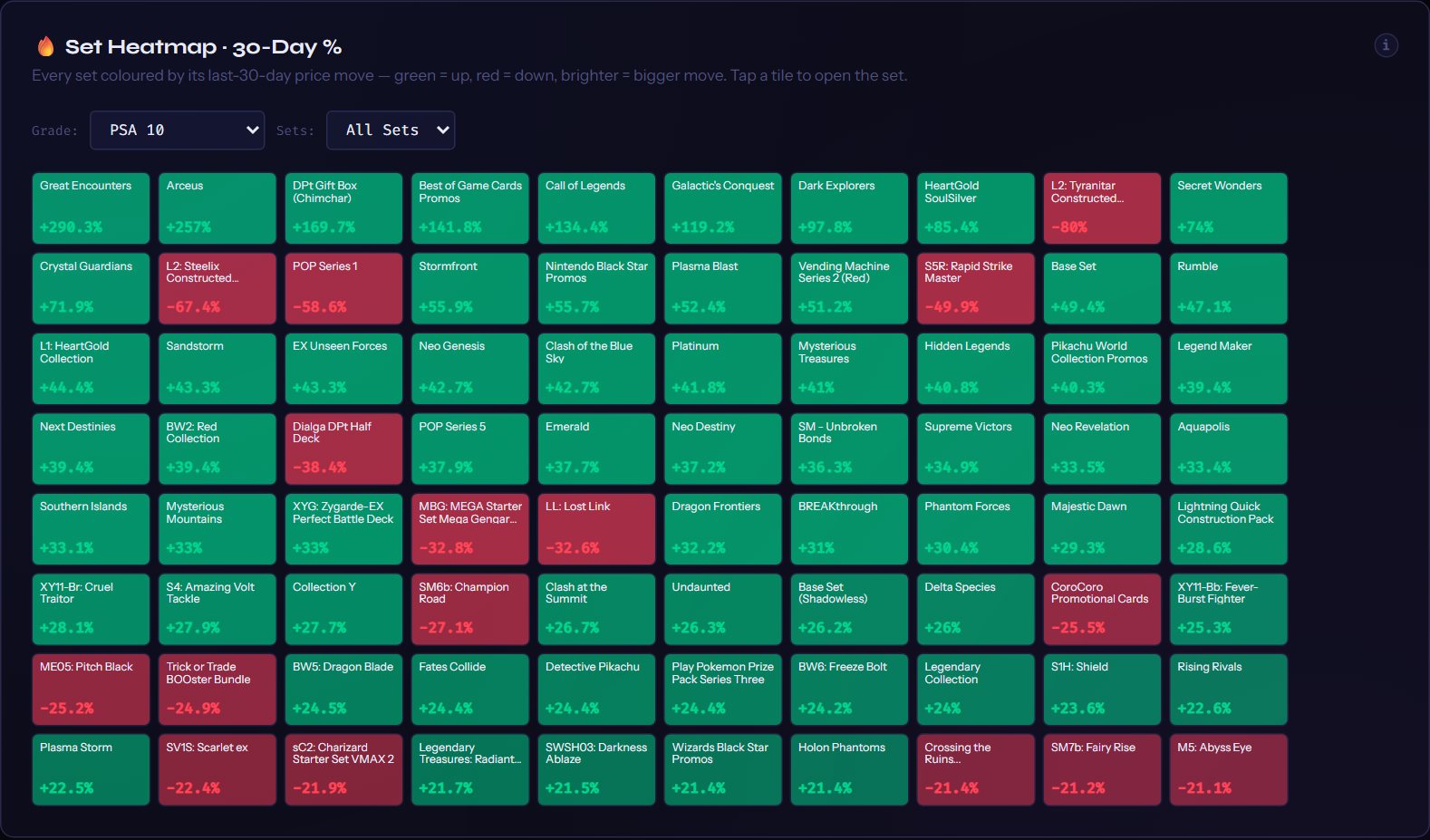
🔥 Set Heatmap · 30-Day %
Every set coloured by its last-30-day price move — green = up, red = down, brighter = bigger move. Tap a tile to open the set.
Grade: Sets:
Loading…
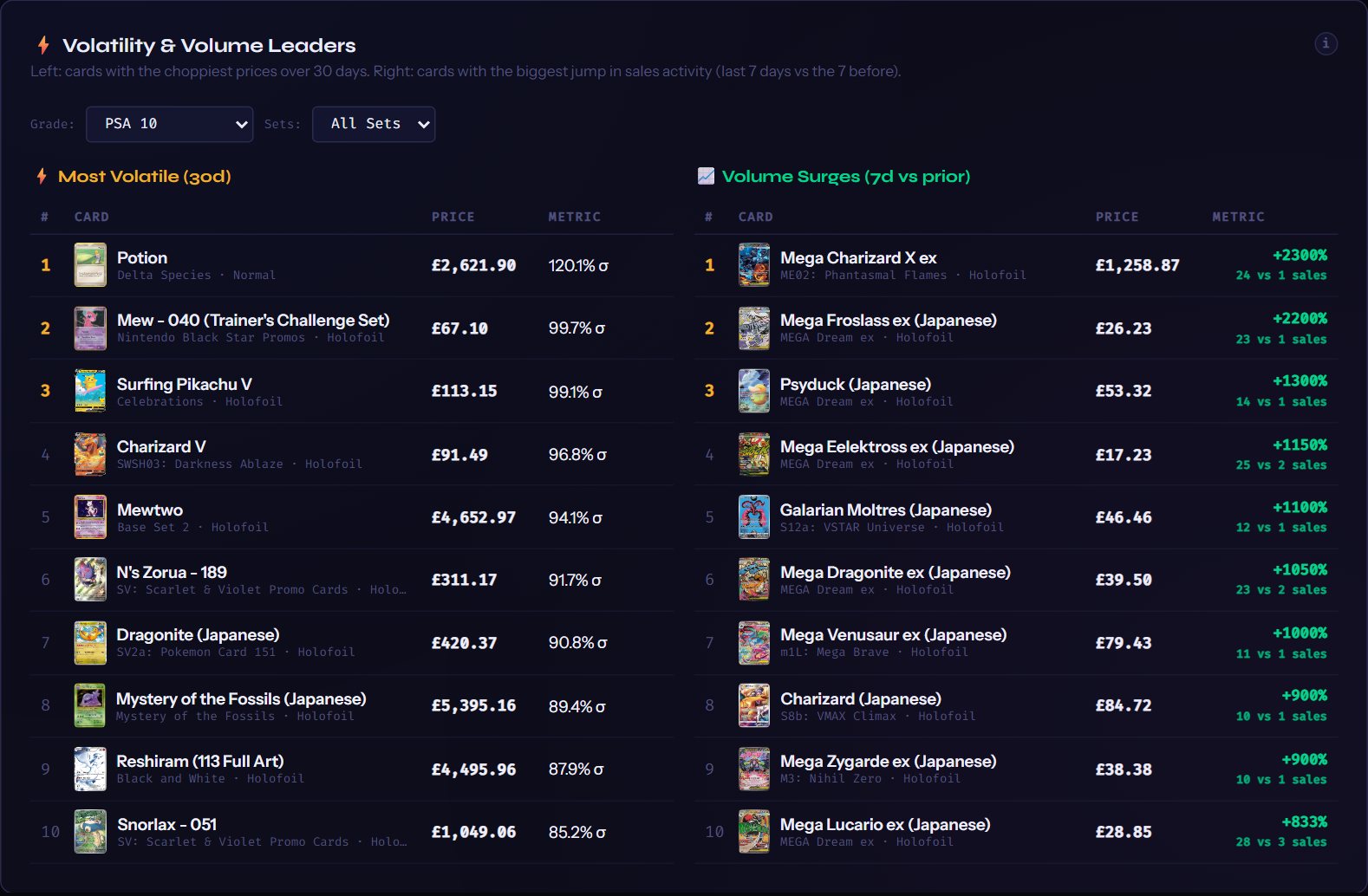
⚡ Volatility & Volume Leaders
Left: cards with the choppiest prices over 30 days. Right: cards with the biggest jump in sales activity (last 7 days vs the 7 before).
Grade: Sets:
⚡ Most Volatile (30d)
Loading…
📈 Volume Surges (7d vs prior)
Loading…
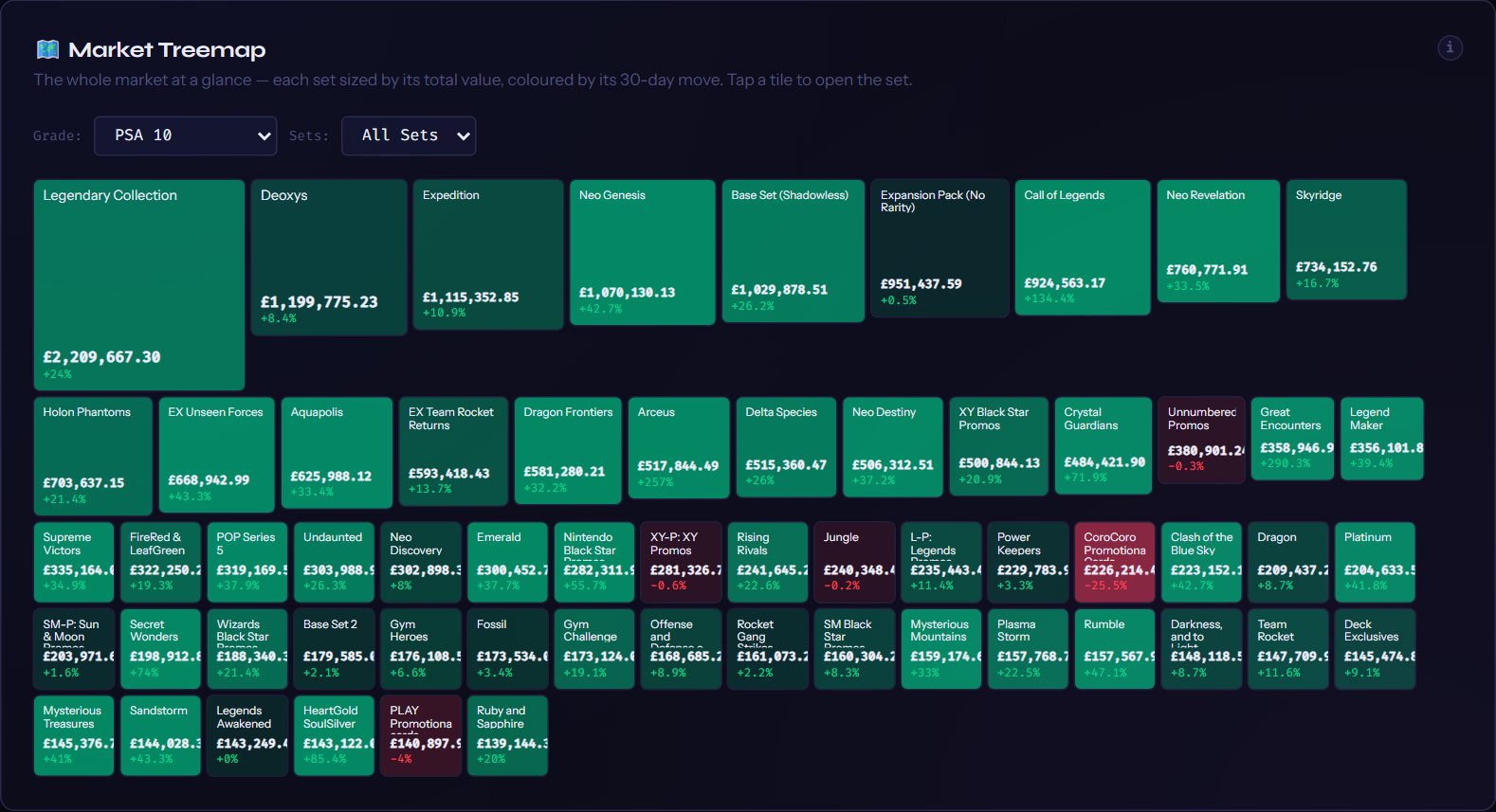
🗺️ Market Treemap
The whole market at a glance — each set sized by its total value, coloured by its 30-day move. Tap a tile to open the set.
Grade: Sets: Show:
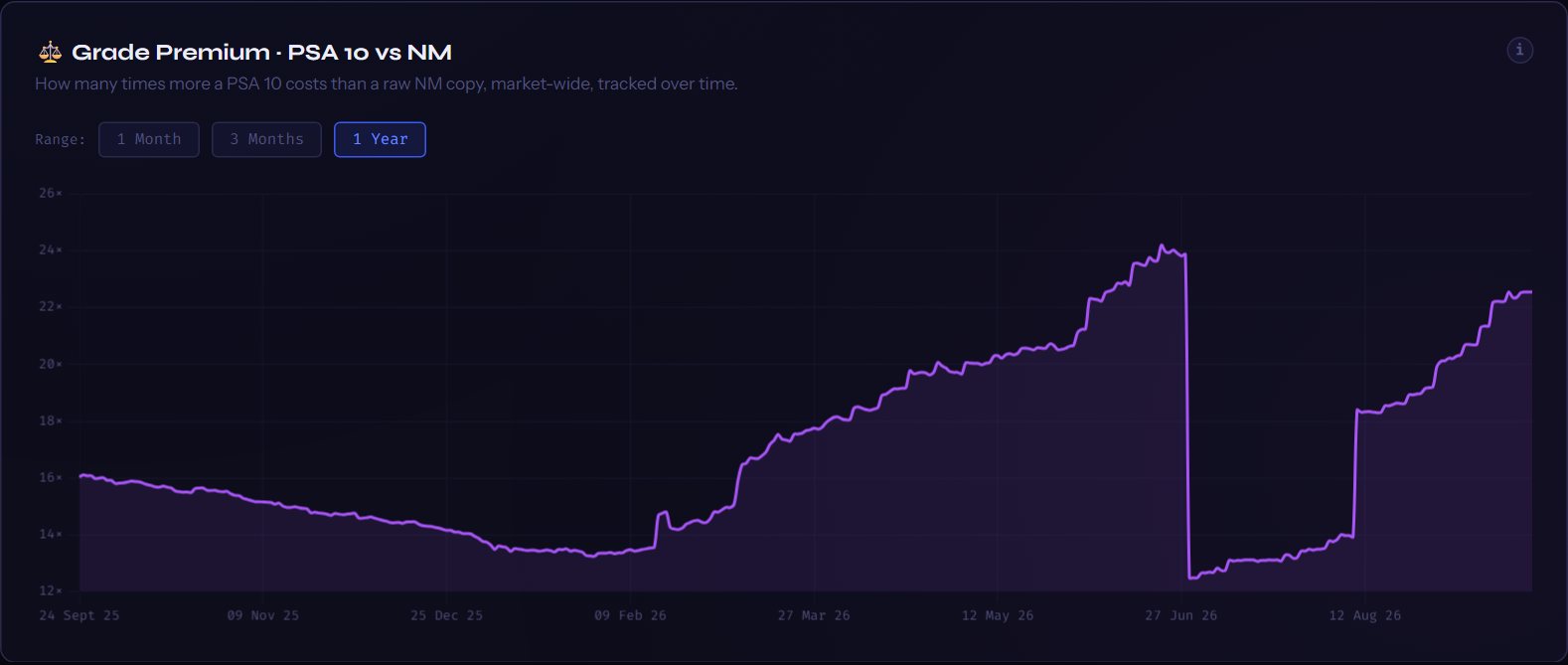
⚖️ Grade Premium · PSA 10 vs NM
How many times more a PSA 10 costs than a raw NM copy, market-wide, tracked over time.
Range:
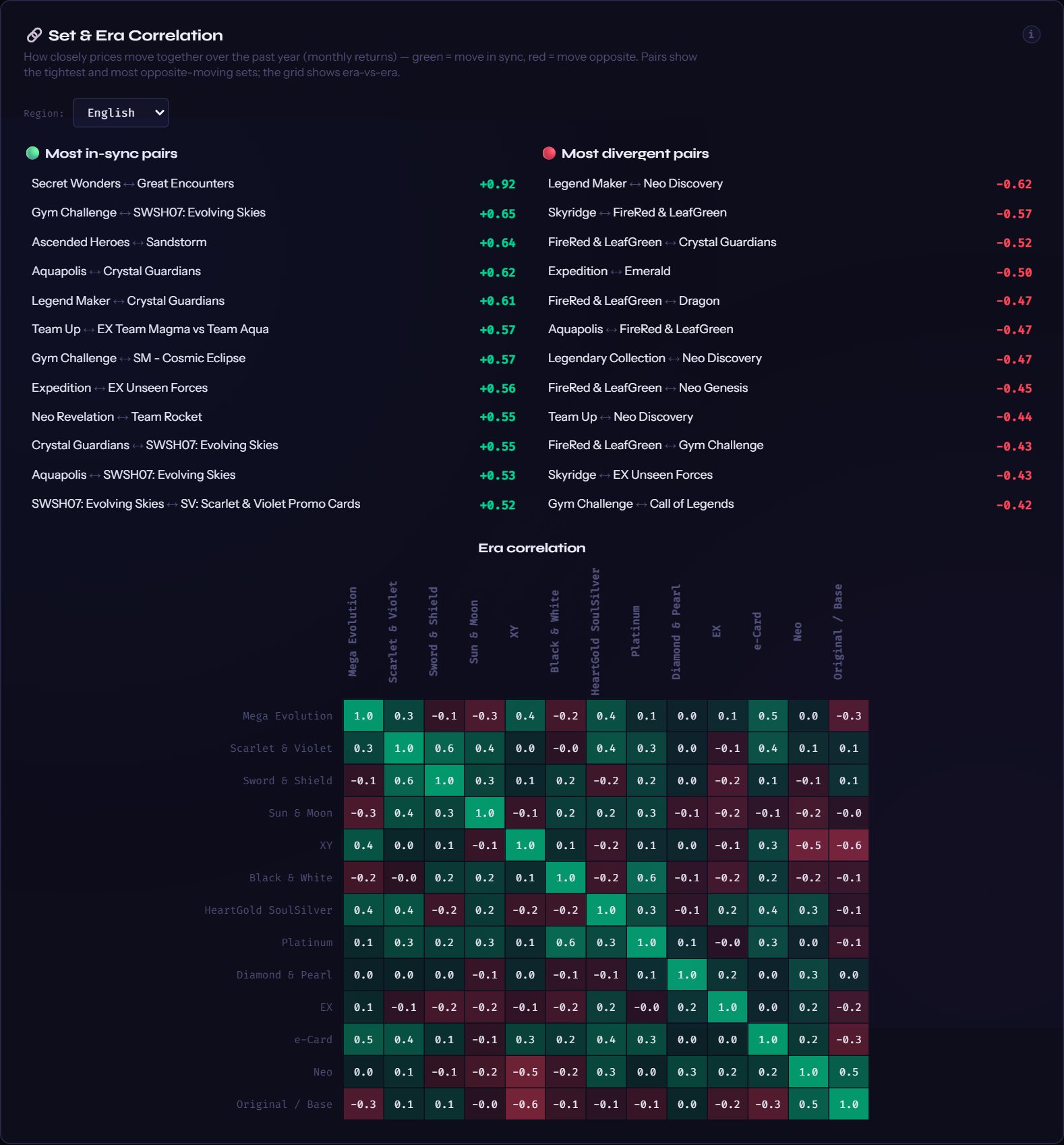
🔗 Set & Era Correlation
How closely prices move together over the past year (monthly returns) — green = move in sync, red = move opposite. Pairs show the tightest and most opposite-moving sets; the grid shows era-vs-era.
Region:
Loading…
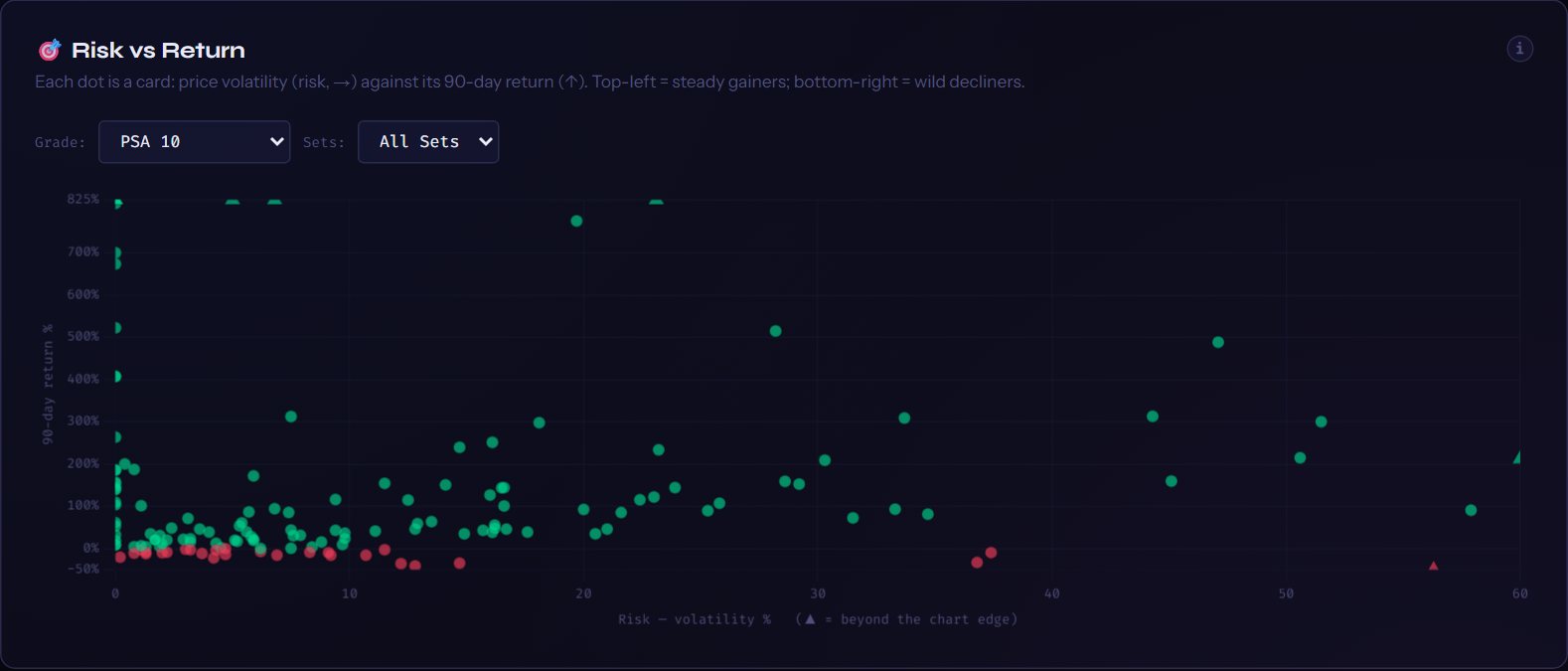
🎯 Risk vs Return
Each dot is a card: price volatility (risk, →) against its 90-day return (↑). Top-left = steady gainers; bottom-right = wild decliners.
Grade: Sets:
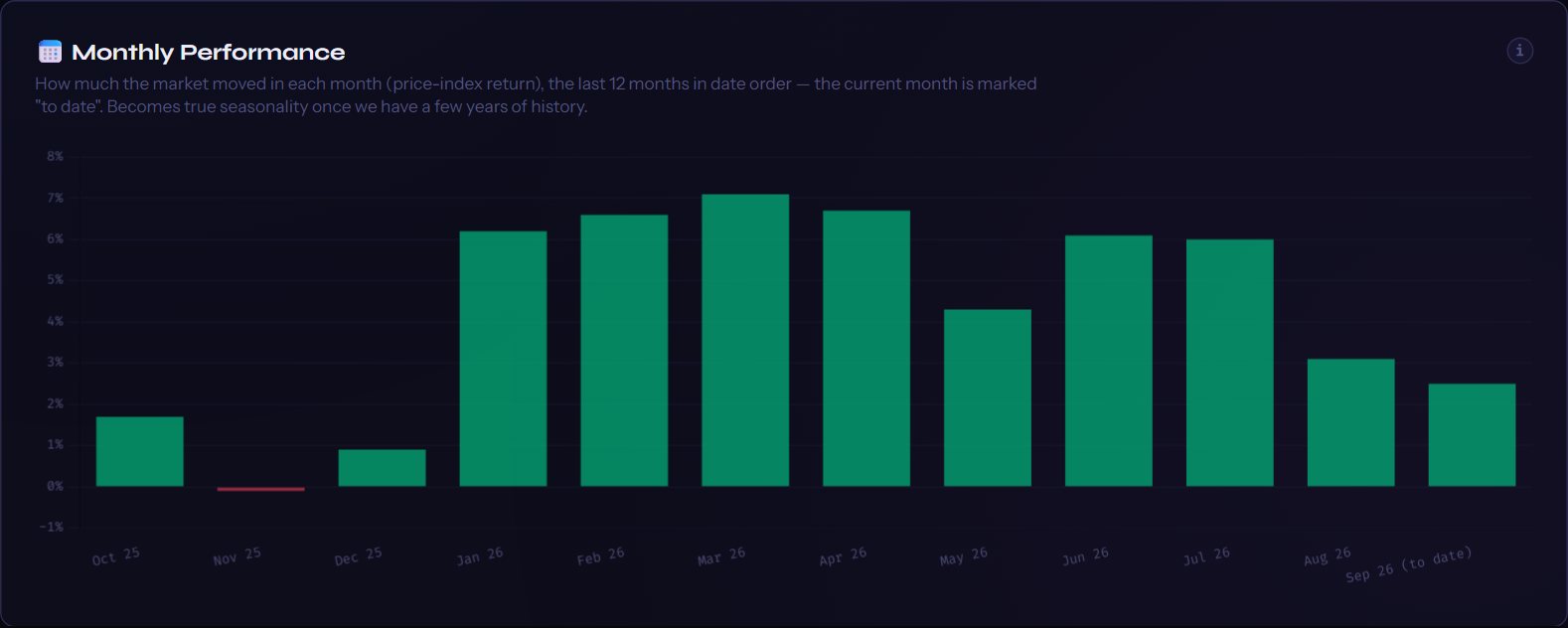
📅 Monthly Performance
How much the market moved in each month (price-index return), the last 12 months in date order — the current month is marked "to date". Becomes true seasonality once we have a few years of history.

PokéIndex™

Global Prices. In One Card.

Every price on the planet, on one card

A card doesn't have one price — it has many. It sells for one figure in America, lists for another in Europe, and trades graded in a market of its own. Look in any single place and you're seeing a fraction of the truth.

PokéIndex collates pricing points from markets around the globe and embeds them into a single card view — raw and graded, sold prices and live asks, side by side and blended into one clear figure. When you look up a card here, you're not seeing one website's opinion. You're seeing the world market's verdict — so you can know, with confidence, what a card is actually worth.

Global prices, in one card. That's the whole idea.

Where markets meet nostalgia

PokéIndex was built on a simple conviction: Pokémon cards have become a financial asset class — and nobody was treating them like one.

The stock market has Bloomberg. Crypto has its terminals and tickers. But the collector standing in a card shop, weighing up a £2,000 Charizard, has been left to piece together screenshots, forum hearsay and gut feel. We built PokéIndex to close that gap: institutional-grade market analytics, for cards.

Our story

PokéIndex was created by a trader who spent fifteen years in the financial markets, pricing risk and reading price action for a living — and who has been collecting Pokémon cards since the age of nine.

For years those were two separate worlds. One was spreads, volatility and indices; the other was binders, booster packs and the smell of a freshly opened pack. Then, somewhere along the way, the two worlds merged. Graded slabs began behaving like securities. Populations, condition premiums and auction results started moving the way order books move. Vintage cards developed the supply-and-demand character of scarce assets. The hobby hadn't just grown up — it had financialised.

Watching that happen from a trading desk, one thing became obvious: this market had real capital flowing through it, but none of the infrastructure serious capital deserves. No price index. No consolidated tape. No honest way to ask the questions any investor would ask of any other asset: What's it really worth today? How volatile is it? What's it done over twelve months? Is the whole market rising, or just the card I happen to be staring at?

So we built the thing we wished existed.

What PokéIndex does

Every card. Every set. From the beginning. Every day, PokéIndex tracks prices across the market globally — covering both English and Japanese cards, raw and graded, from 1999's Base Set to this month's newest release.

On top of that data we've built the full toolkit of a professional market terminal:

Behind every one of those charts sits the same engine: tens of thousands of cards priced daily across raw and graded markets, with years of sale history behind them. Few asset classes this young have data this deep — and it compounds every single day.

What we refuse to do

Anyone who has traded on bad data knows it's worse than no data. So PokéIndex runs on a rule that costs us nothing but discipline: we would rather show you no price than the wrong price.

Thin, unreliable listings get filtered. Suspect data gets flagged, not hidden. Where a value is estimated rather than observed, we mark it as an estimate — built on established market practice, never presented as a live sale. And when two similar cards can't be told apart with certainty, we hold back rather than guess. Every number on this site is one we're prepared to stand behind.

Why it matters

Whether you're a collector who wants to know what your childhood binder is worth, an investor sizing up an alternative asset, or a player wondering whether to grade your pulls — you deserve the same quality of information a trader gets before risking a dollar.

That's the standard this site is built to. Not a price-checker. A market terminal for what your nine-year-old self already knew was treasure.

— PokéIndex

📖 How to use PokéIndex

Five minutes here and every number on the site will make sense. Pick the part you want:

What PokéIndex is

PokéIndex tracks Pokémon card prices from the world's major markets — eBay sold listings, TCGPlayer and Cardmarket — plus graded-card values for every major grading company, and brings them together in one place, in your currency. English and Japanese cards each have their own complete, separate price data.

STEP 1

Finding a set

The left sidebar lists every set, grouped by era, newest first. Use the 🇬🇧 English / 🇯🇵 Japanese toggle at the top to switch languages, and the Search sets… box to jump straight to a set by name.

For the classic WOTC-era sets (Base Set, Jungle, Fossil, the Gyms and Neos), clicking the set name in the sidebar opens a small sub-menu so you can browse the ① 1st Edition and ∞ Unlimited printings separately — and for Base Set, Shadowless too. They're different cards with different prices, so each gets its own view.

STEP 2

Inside a set — the grid, the filters, the tiles

Open a set and every card in it appears as a tile. Here's the real Base Set page with each control lettered — the list underneath explains what each one does.
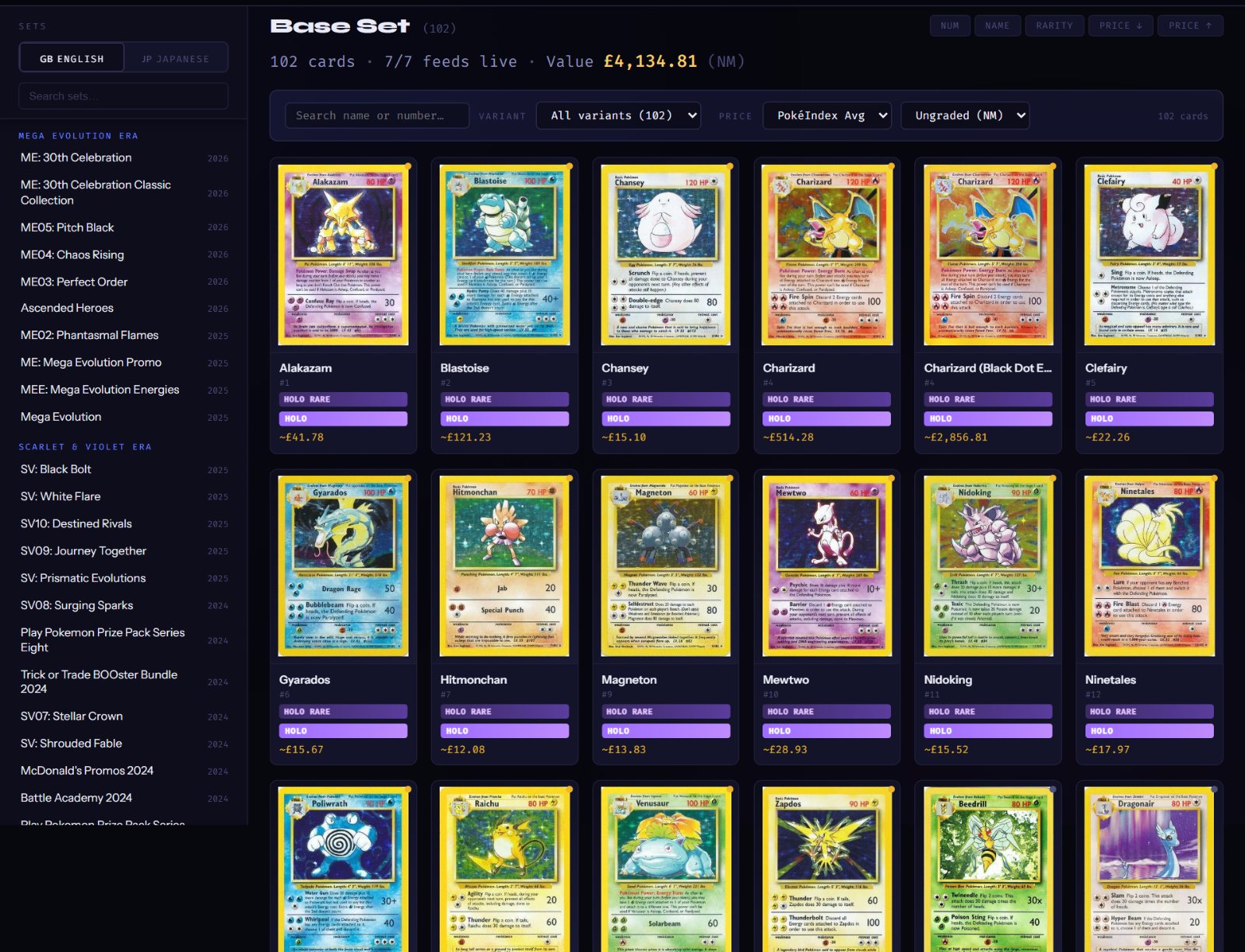
SNAPSHOT — the real Base Set (English) page as captured from the live site on 22 Sept 2026: sidebar, set header, the filter bar and the first rows of tiles. Prices were real that day; the live grid always shows current data.
The Base Set page: the set sidebar on the left with the English/Japanese toggle and set search; on the right the set title with its stats line, the sort buttons, the search / variant / price filter bar, and the grid of card tiles with holo badges and prices
A
Search & variant filter. The search box finds any card in the open set by name or number — typing 25 finds 025/185. The Variant dropdown narrows the grid to one printing (Holo, Reverse Holo, 1st Edition…), with the count of each shown. The counter on the right always tells you how many of the set's cards you're seeing.
B
The Price filter — price the whole set your way. Two dropdowns: pick a grader (PokéIndex Avg is the default, or PSA, BGS, CGC, SGC, TAG, ACE, AGS) and a grade. Every tile instantly re-prices to your choice. Ungraded (NM) lives under PokéIndex Avg; the grading companies only offer grades 1–10 — graders don't grade ungraded cards. Your choice sticks while you browse the set. Plans: Near Mint is free for everyone; PSA, BGS and CGC whole grades are a Collector feature; SGC, TAG, ACE, AGS and the half grades are Investor. A locked choice shows a 🔒 and a gold pill — click the pill to see the plans.
C
Sorting. By card number, name, rarity, or price — and price sorting follows whatever Price filter you've picked, so "Price ↓" under PSA 10 ranks the set by PSA-10 value.
D
The tile. Card image, name and number, a corner dot for premium rarities, plus two badges: the variant pill — 1ST EDHOLOREVERSE HOLOUNLIMITEDSHADOWLESS — and the rarity badge — RARE HOLOSPECIAL ILLUSTRATION and more, each with its own colour. Every version of a card is its own tile with its own price.
E
The tile price. ~£632.15 — the ~ means Near Mint blend (the default). Pick a grader and it changes to labels like PSA 10 ~ £23,701. A ○ marks an estimated value, a ⚠ marks a figure our checks substituted — the same markers you'll meet on the card page below. Tiles and card pages are priced by the same engine, so they always agree. Click any tile to open the full card page. Near Mint tile prices are free for everyone; graded tile prices follow your plan (see B).
F
The set sidebar. Every set, grouped by era, newest first. The 🇬🇧 English / 🇯🇵 Japanese toggle switches language and the search box jumps to a set by name — see Step 1.
G
The set stats line. Under the title: how many cards are in the set, how many of our price feeds are live right now, and the Value — the total of every card shown, under whatever Price filter you have picked. Narrow the grid with the filters and the value follows.
STEP 3

The card page — every price explained

Click any tile and you get the full picture for that exact card. Below is the real card page for Charizard · Base Set #4 (Holofoil), top to bottom, frozen on 23 Sept 2026 — the live page always shows today's numbers. Each part is explained underneath, top to bottom. When you've read it, open a real page with the button at the end — Charizard 1st Edition (Base Set Shadowless), which PokéIndex opens in full to every visitor so you can see every zone without an account.
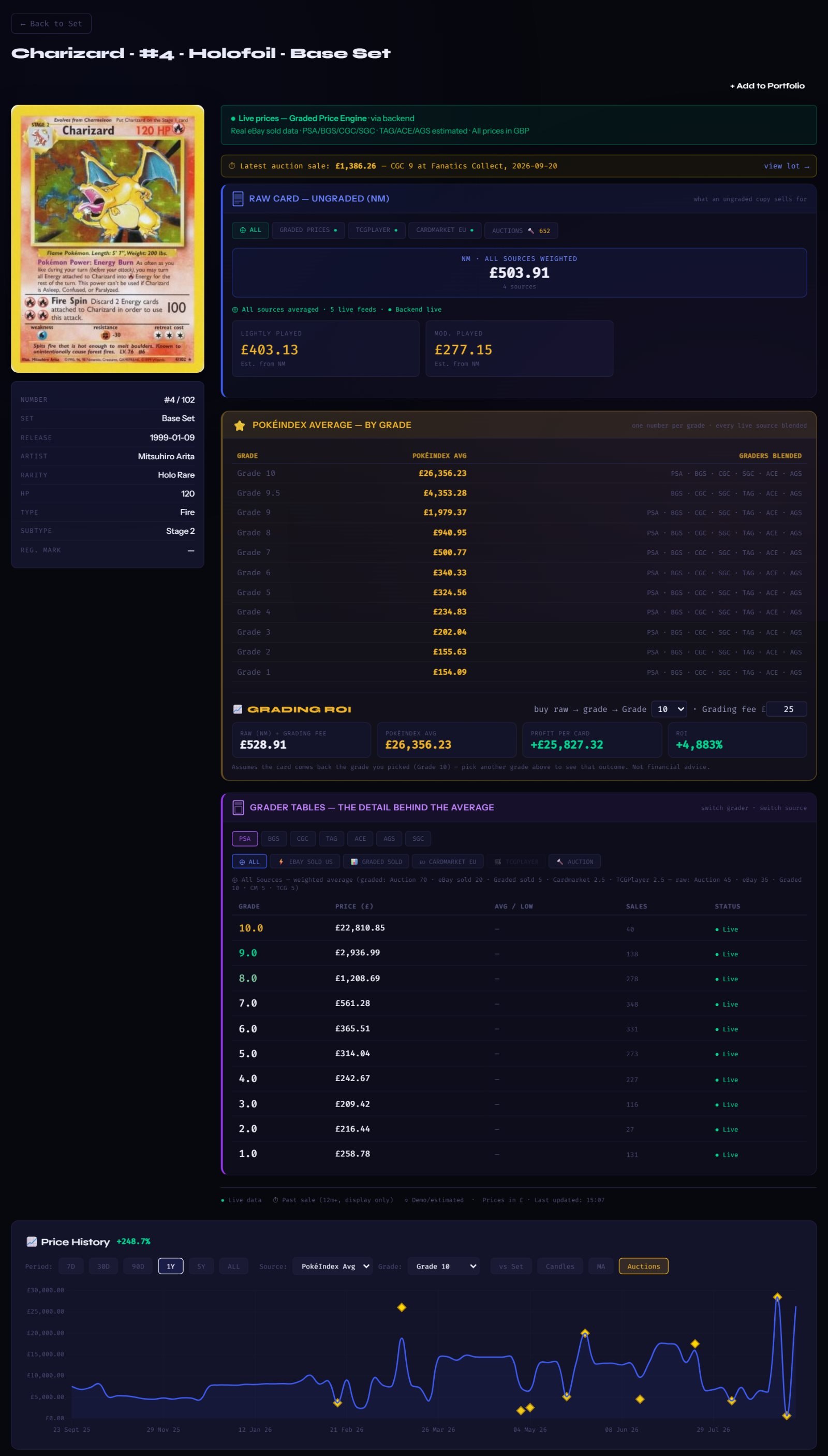
SNAPSHOT — Charizard · Base Set #4 (Holofoil), the whole card page as captured from the live site on 23 Sept 2026. Every figure was real that day; the live page moves with the market.
The whole Charizard Base Set #4 card page: card image and details on the left; on the right the latest auction sale strip, the blue Raw Card zone, the gold PokéIndex Average zone, the purple Grader Tables zone, then the Price History chart with auction diamonds and the eBay live listings
1
The card. Its image, then number, set, release date, rarity and the other card facts. The title line at the top names the exact printing: Charizard · #4 · Holofoil · Base Set.
2
Latest auction sale strip. The newest auction-house sale of this card — price, grade, house and date — with a link to the lot. Here: £1,386 for a CGC 9 at Fanatics Collect on 20 Sept 2026. Free visitors see the grade, house and date with the price hidden — the price is a Collector feature.
3
Raw Card — Ungraded (NM), the blue zone. What an ungraded copy sells for. The headline is our Near Mint blend of every live source (£503.91, from 4 sources). The pills above it switch the view to one source at a time — graded prices, TCGPlayer, Cardmarket EU, or the Auctions pill with its count of recorded sales (638). Lightly Played and Moderately Played are estimated from NM. The raw zone is free for everyone; the Auctions pill's sale history is Collector (latest sale) and Investor (the full history).
4
PokéIndex Average — by grade, the gold zone. Our headline view: one number per grade, every live source and every grading company blended, with the graders that fed each figure listed on the right. The best single answer to "what is this card worth?" Under the table sits Grading ROI: what you would make by buying a raw copy, paying to grade it (type in your own grading fee) and getting a given grade back — pick the grade (10 down to 1) and it shows the profit per card and the return % for that outcome. It uses the raw price above and the PokéIndex Avg for the grade you picked from this table, nothing else. PokéIndex Average by grade is a Collector feature (whole grades); half grades and Grading ROI are Investor.
5
Grader Tables — the detail behind the average, the purple zone. Pick a grader (PSA, BGS, CGC, TAG, ACE, AGS, SGC) and a source (All, eBay sold, graded sold, Cardmarket, TCGPlayer, Auction). The table shows that grader's price for every grade, how many sales sit behind it, and whether the figure is live. A ○ marks an estimate (no recent sale — filled from the card's real sales using the grading market's own premiums); a ⚠ marks a substituted figure (the newest sale failed our checks, so the last trustworthy price is shown). PSA, BGS and CGC tables are Collector; TAG, ACE, AGS and SGC, and the half-grade rows, are Investor.
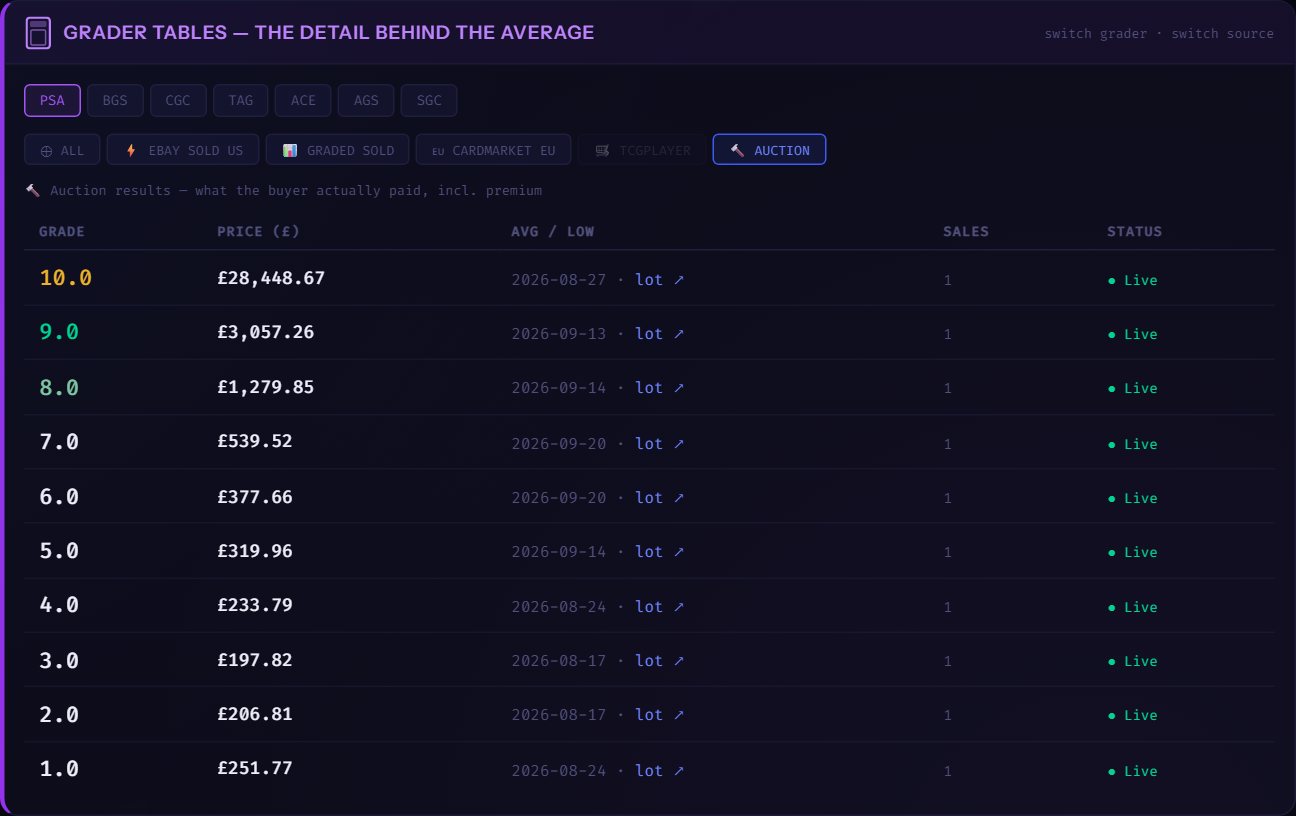
5 · the Auction source
The Grader Tables zone with PSA and the Auction source selected: a real dated auction sale for every grade, each with a lot link
5
Choose 🔨 Auction and every grade shows a real auction result — what the buyer actually paid, premium included — with its date and a lot ↗ link to the sale. PokéIndex records sales from eight auction houses: Goldin, Fanatics Collect, Alt, Catawiki, SGB, Ewbanks, Excalibur and REA. Not an average, not an estimate — a dated sale you can click through to.
6
Price History. The chart tracks any grade over time. Choose the period (7D · 30D · 90D · 1Y · 5Y · ALL), the source (PokéIndex Avg or PSA) and the grade; the percentage by the title is the move over the period shown (+284% for a Grade 10 over the year in the picture). Three extra views: vs Set draws the card against its whole set, both starting at 100 — is the card beating its set? Candles shows each week's open, high, low and close, like a stock chart. MA overlays 50- and 200-point moving averages. With Auctions on, every recorded auction sale for that grade is a gold diamond on the day it sold — hover for the house and grade, click to open the lot. 7D and 30D Near Mint history is free for everyone; 90D and 1Y with PSA, BGS and CGC lines are Collector; 5Y, ALL, vs Set, Candles, MA and the auction diamonds are Investor.
7
eBay Live Listings sits under the Price History chart (not in this picture): what is for sale right now on eleven eBay marketplaces, split into raw and graded copies — explained button by button in Step 4 below. Asking prices, not sold prices — useful for "what would it cost me today?" Free for everyone.
8
+ Add to Portfolio — add this exact card, with the grade and price you paid, to My Portfolio (the Portfolio guide covers it). The currency picker in the top bar converts every figure on the site between GBP, USD, EUR, JPY and AUD — and any price you type into the portfolio is taken in that currency too. (Collector and Investor plans — Free accounts get 3 full card pages a month instead.)

Same layout, today's prices — this card page is free for everyone, in full. Use ← Back to return here.

The one distinction to remember

PokéIndex Avg is an average. It blends every price source and every grading company's data into one representative figure per grade — the best single answer to "what is this card worth?"

The graded table is not an average. For each grader and grade it shows the last correct sold price — the most recent real sale that passed our checks, with its date. It answers "what did this exact slab last sell for?"

An auction price is a real sale. Choose the Auction source, or a gold diamond on the chart, and you are looking at what one buyer actually paid on one day, premium included, with a link to the lot.

Use the Avg to understand a card's overall value. Use the grader tables and auction sales to see real, dated prices for the exact slab you own or want.

How our estimates work — where a grade has no recent sale, we estimate it from the card's real recorded sales using established market practices: the premiums the grading market itself applies between companies and grades, and interpolation between known prices. We don't publish the exact calculations, but every estimate is anchored to real sales and always marked with ○ — you will never mistake an estimate for a recorded sale.

STEP 4

eBay Live Listings — button by button

At the bottom of every card page: what is for sale right now on eBay for that exact card. Asking prices, not sold prices. Every listing's title is read by the same engine that matches auction lots to cards, so lots, bundles, reprints, other printings and other-language copies are set aside before you see anything. Free for everyone.
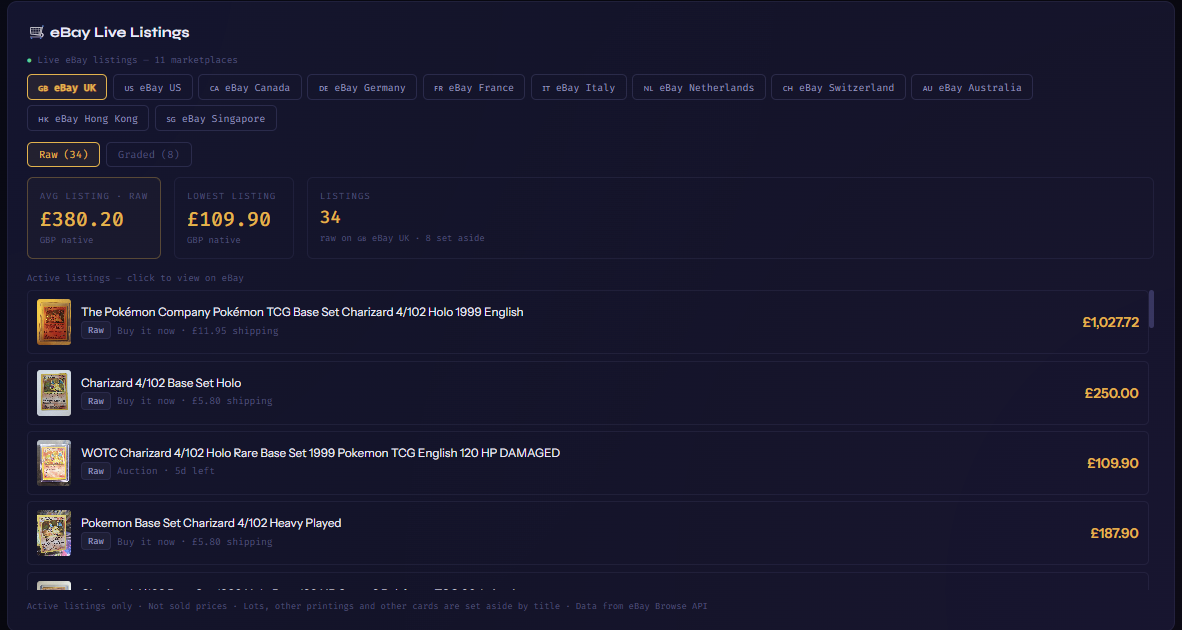
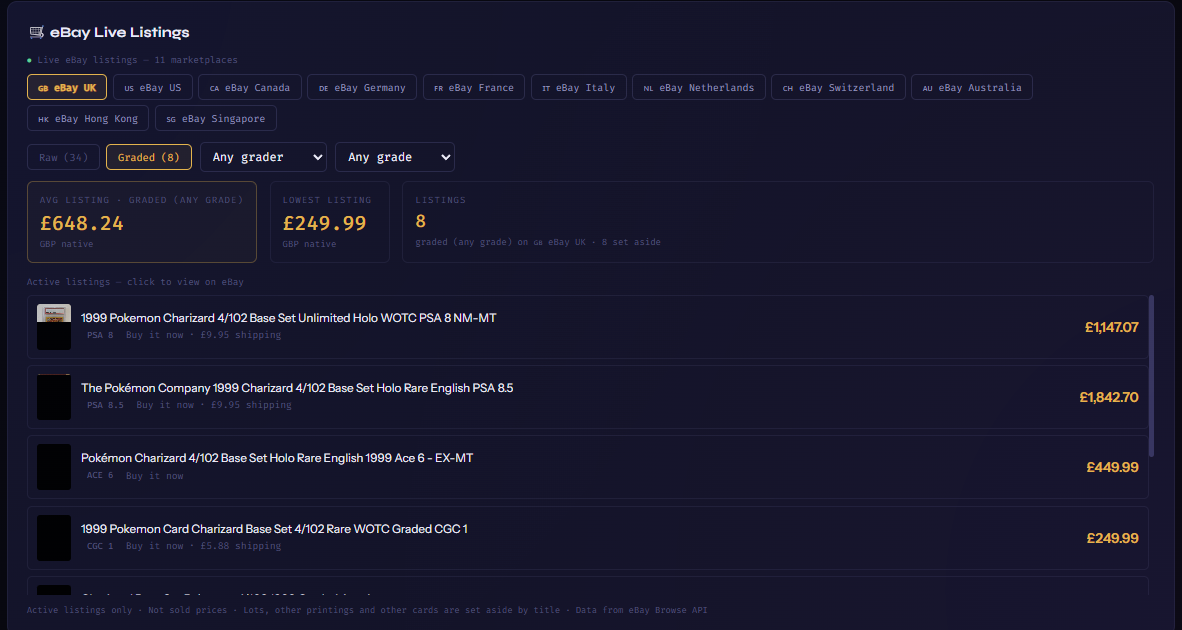
SNAPSHOT — the eBay panel on Charizard · Base Set #4 (Holofoil), eBay UK, captured 3 Oct 2026. Listings change by the hour.
Raw view
The eBay Live Listings panel: eleven marketplace tabs with eBay UK selected, the Raw / Graded toggle on Raw, the average and lowest listing boxes, the listing count, and four raw listings with their price, Buy it now or Auction label, time left and shipping
A
Marketplace tabs. 🇬🇧 UK · 🇺🇸 US · 🇨🇦 Canada · 🇩🇪 Germany · 🇫🇷 France · 🇮🇹 Italy · 🇳🇱 Netherlands · 🇨🇭 Switzerland · 🇦🇺 Australia · 🇭🇰 Hong Kong · 🇸🇬 Singapore. The gold tab is the one you're looking at; each shows listings located in that country, priced in your currency with the local price underneath.
B
Raw / Graded. Raw (34) is ungraded copies; Graded (8) is slabs. The counts are what survived the title check on this marketplace.
C
Avg listing · Lowest listing · Listings. Worked out over exactly the copies you're looking at (raw, or the grader and grade you picked) — never over the whole mixed pile. The small line says how many listings were set aside as lots, other printings or other cards.
D
A listing. Picture, title, a Raw or grade pill, Buy it now or Auction with the time left, the shipping cost, and the price. Click it to open the listing on eBay in a new tab.
Graded view
The same panel with Graded selected: an Any grader picker and an Any grade picker appear, the boxes re-label to graded (any grade), and the rows show PSA 8, PSA 8.5, ACE 6 and CGC 1 pills
E
Grader picker. Opens on Any grader; pick PSA, BGS, CGC, SGC, TAG, ACE or AGS to see only that company's slabs (an Other choice appears when a slab from another company turns up).
F
Grade picker. Any grade, or one grade (10 · 9.5 · 9 · 8.5 … 1 — PSA has no 9.5). Combine them: "AGS · 10" shows only AGS 10 slabs, and the Avg / Lowest / count boxes follow.
G
Nothing there? The panel says so for that selection (e.g. "No CGC 10 listings right now on eBay UK") rather than showing you something else.

Market Stats — the whole market at a glance

Market Stats is PokéIndex's trading floor: seventeen charts and boards covering the entire tracked market. Three filters repeat across almost all of them, so once you know these you can drive everything:

🇬🇧/🇯🇵 — English, Japanese or all sets   NM / PSA 10 — raw or graded prices   1M · 3M · 1Y — the time window

Plans: Market Index, Price Index, Market Pulse and Set Value are free for everyone (Near Mint and PSA 10), and so is the price ticker. The Price Movers and Most Valuable boards show the top 3 free, the top 5 on Collector and everything on Investor. On Auction Houses the monthly volume chart and the collection health line are free; the notable-sales strip and the 7-day and 30-day top-sales boards are Collector (their top 5), and the all-time board and browsing sales by house are Investor. The remaining charts and boards are Investor features.

A chip bar at the top of the page jumps to any chart, the "Market data through…" stamp shows data freshness, and every chart carries an ⓘ button explaining what it shows and why it matters. Here's the full directory, each with a real picture of that chart as it looked on 23 Sept 2026 — click any title or picture to open the live chart:
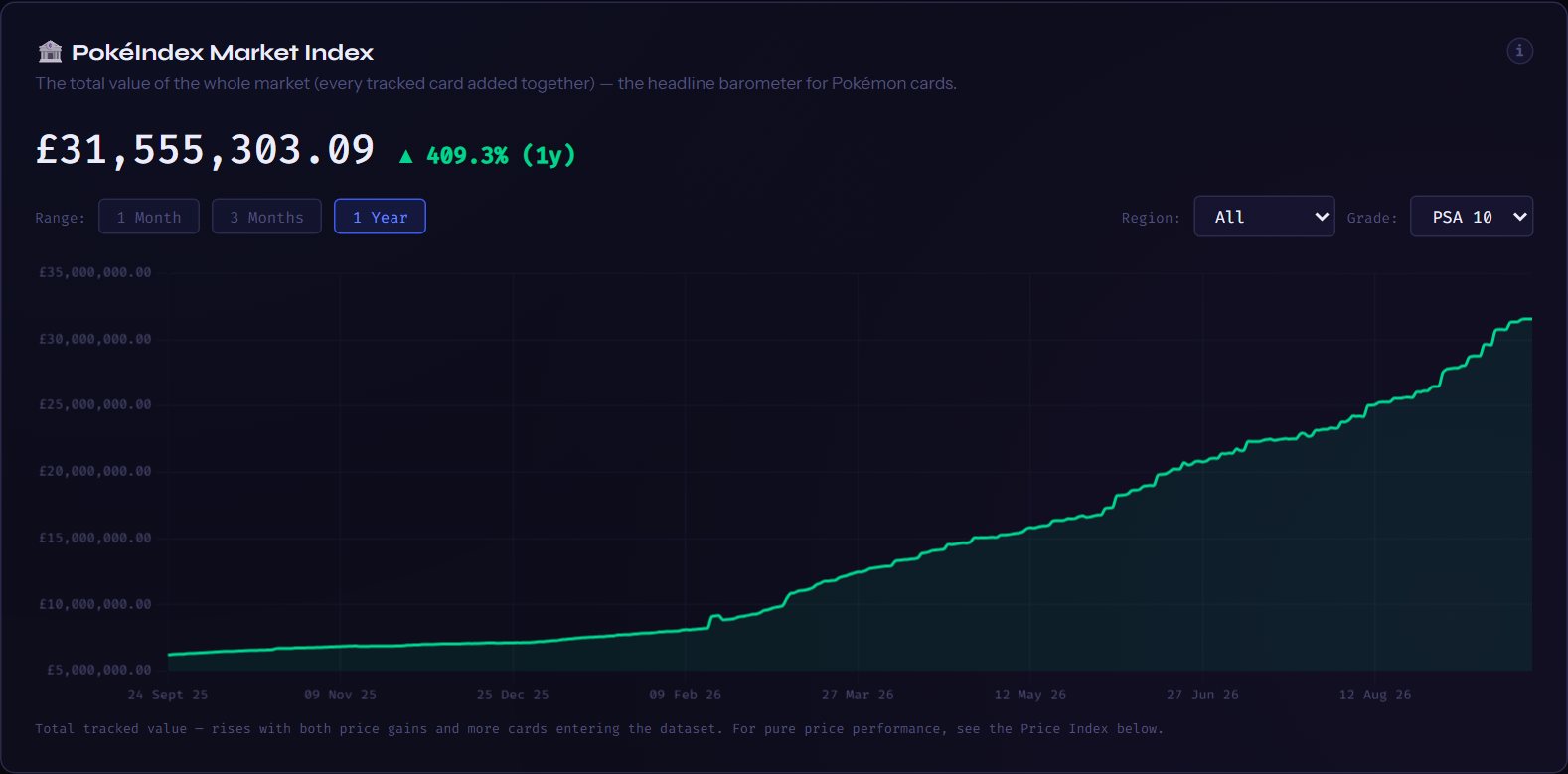
🏦 PokéIndex Market Index
The combined value of every card we track, updated daily — the market capitalisation of the Pokémon card market.
Filters: 1M/3M/1Y · All/English/Japanese · NM/PSA 10
🏦 PokéIndex Market Index — as it looked on 23 Sept 2026
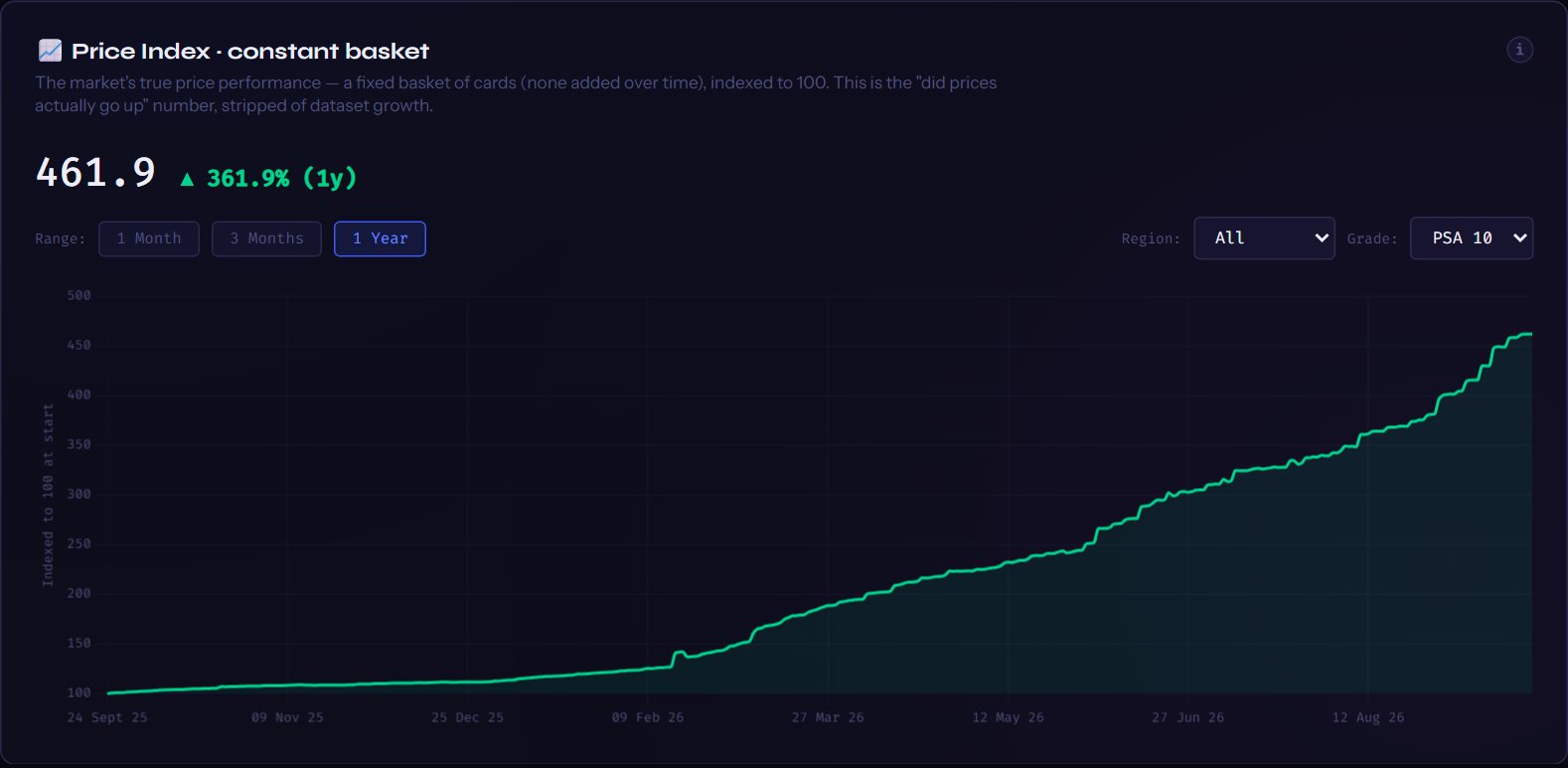
📈 Price Index · constant basket
A fixed basket of the same cards indexed to 100 — the truest answer to "are prices actually going up?", with dataset growth stripped out.
Filters: 1M/3M/1Y · All/English/Japanese · NM/PSA 10
📈 Price Index · constant basket — as it looked on 23 Sept 2026
🌡️ Market Pulse
Two health checks in one: market breadth (how many cards rose vs fell in 30 days) and the Fear & Greed dial — 0 is washed-out fear, 100 is overheated greed.
Filters: none — one glance, no knobs
🌡️ Market Pulse — as it looked on 23 Sept 2026
📈 Set Value
Whole sets charted like stocks — the total value of every card in a set, tracked over time. Search and compare up to 8 sets on one chart — a set with more than one printing gets a line per printing (Gym Challenge below: 1st Edition dashed, Unlimited solid).
Filters: 1W/1M/3M/1Y/All · NM/PSA 10 · EN/JP set search & picker
📈 Set Value — Gym Challenge over 1 year at PSA 10, 1st Edition (dashed) and Unlimited (solid) lines, as it looked on 3 Oct 2026
🏆 Price Movers
The market's biggest gainers and decliners over your chosen period, smoothed so one odd sale can't crown a false winner. Click any card to open its page. Cards under £5 are kept off the boards.
Filters: % movers / biggest £ moves · show 10–100 · 1W/1M/3M/1Y · NM/PSA 10 · All/EN/JP · Era
🏆 Price Movers — as it looked on 23 Sept 2026
💎 Most Valuable Cards
The priciest cards we track, ranked by the same values the card tiles show — and the Character filter ranks the top 10 for a single Pokémon, from Charizard to Greninja. Click any card to open its page.
Filters: PSA 10/NM · All/EN/JP · Character (20 most coveted)
💎 Most Valuable Cards — as it looked on 23 Sept 2026
📈 Grading ROI
The cards that return the most if you buy a raw copy, grade it and it comes back a PSA 10 — profit per card and return %, with your own grading fee. Live prices only, raw copies under £5 left out. Click any card to open its page.
Filters: Top 10 / 25 / 50 / 100 · All/EN/JP · Era · grading fee
Grading ROI board — as it looked on 23 Sept 2026
🔨 Auction Houses
Real sold results from the eight auction houses PokéIndex tracks — every price is what the buyer actually paid, premium included, converted to GBP. Top-sales boards for the last 7 days, 30 days and all time, and a browse-by-house list of recent sales. A matched sale opens its card page.
Filters: 7 days / 30 days / all time · house picker
🔨 Auction Houses — as it looked on 23 Sept 2026
📈 Era ETFs
Each era (Vintage WOTC, EX, Sword & Shield…) rebuilt as an index starting at 100, like sector ETFs — watch where collector money flows between generations.
Filters: 1M/3M/1Y · EN/JP · NM/PSA 10 · era chips toggle lines on/off
📈 Era ETFs — as it looked on 23 Sept 2026
📐 52-Week Distance
Cards trading closest to their one-year highs (momentum) and one-year lows (rebound watch), most valuable first.
Filters: NM/PSA 10 · All/EN/JP
📐 52-Week Distance — as it looked on 23 Sept 2026
🔥 Set Heatmap · 30-Day %
Every set as a coloured tile — green up, red down, brighter = bigger move. A ten-second answer to "where is the action this month?" Click a tile to open the set.
Filters: NM/PSA 10 · All/EN/JP
🔥 Set Heatmap · 30-Day % — as it looked on 23 Sept 2026
⚡ Volatility & Volume Leaders
The choppiest prices of the last 30 days, and the cards whose sales activity jumped most this week — activity spikes often come before price moves.
Filters: NM/PSA 10 · All/EN/JP
⚡ Volatility & Volume Leaders — as it looked on 23 Sept 2026
🗺️ Market Treemap
The entire market in one picture — each tile a set, sized by total value, coloured by its 30-day move. The same layout financial terminals use for stocks.
Filters: NM/PSA 10 · All/EN/JP
🗺️ Market Treemap — as it looked on 23 Sept 2026
⚖️ Grade Premium · PSA 10 vs NM
How many times more a PSA 10 costs than the same card raw — the price of perfection, tracked market-wide over time.
Filters: 1M/3M/1Y
⚖️ Grade Premium · PSA 10 vs NM — as it looked on 23 Sept 2026
🔗 Set & Era Correlation
Which sets and eras move together and which move opposite — the classic diversification view for balancing a collection.
Filters: EN/JP
🔗 Set & Era Correlation — as it looked on 23 Sept 2026
🎯 Risk vs Return
Every card plotted by how wild its price is against how much it returned in 90 days. Top-left corner — strong gains, steady prices — is the prize.
Filters: NM/PSA 10 · All/EN/JP
🎯 Risk vs Return — as it looked on 23 Sept 2026
📅 Monthly Performance
The market's average return in each calendar month — do prices run up before Christmas? A true seasonality picture builds as history accumulates.
Filters: none
📅 Monthly Performance — as it looked on 23 Sept 2026
STEP 1

My Portfolio — what it is and what your plan gives you

My Portfolio is your own collection, valued every night by the same engine that prices the rest of the site — so your cards move with the market. Add cards one at a time, tick a whole set, or import a file; record what you paid; sell cards when they go; set price alerts. Nothing in it is ever shared or shown to anyone else.

Plans: Collector keeps up to 25 cards and 10 alerts, with the PokéIndex Average and the PSA, BGS and CGC whole grades to price them. Investor is unlimited, adds every grader and half grade, folders, file import and export to Excel. If an Investor drops to Collector later, nothing is deleted: the 25 most valuable cards stay active and the rest are parked — kept, greyed out, unpriced — until you upgrade again.

The page has five tabs — Dashboard Cards Sold Costs Alerts — the card count, and the + Add Card button, which is where we start.

The pictures in this guide are from a real portfolio on 3 Oct 2026 — sets, folders and prices are genuine; account details are cropped out.
STEP 2

Adding one card

Press + Add Card on the portfolio page, or + Add to Portfolio on any card page (which arrives with the card already picked).
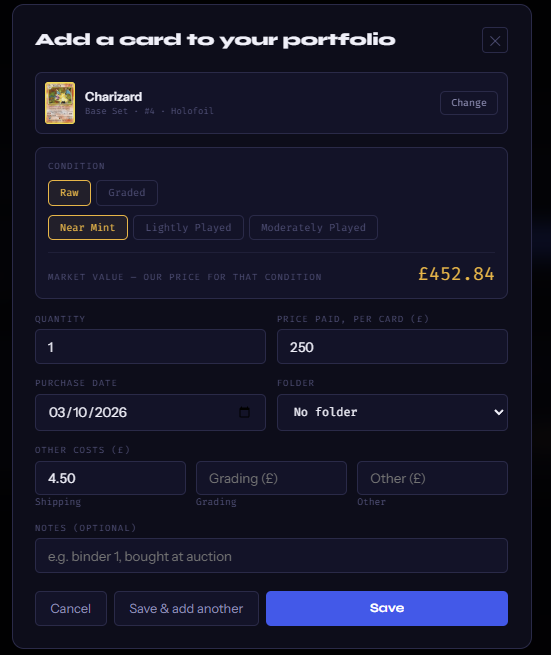
The Add a card box
The Add a card box with Charizard Base Set #4 Holofoil picked: Condition (Raw / Graded, Near Mint selected) with the market value for that condition, Quantity, Price paid per card, Purchase date, Folder, Other costs (shipping, grading, other), Notes, and Cancel / Save & add another / Save
A
Card — type to search our catalogue. Name, number, set — Charizard 4 base set — and pick the exact printing from the list (Holo, 1st Edition, Shadowless, the 4th Print… each is its own card). Change swaps it. If we don't carry the card, Can't find it? Add it as unmatched keeps it in your list at the value you give it, unpriced by us.
B
Condition. Raw — Near Mint, Lightly Played or Moderately Played — or Graded, then the company (PokéIndex Avg, PSA, BGS, CGC, SGC, TAG, ACE, AGS) and the grade. The market value line shows what we'd value it at in that condition before you save.
C
Quantity · Price paid, per card · Purchase date · Folder. Money is typed in the currency the top bar is set to — the symbol on the box tells you. Folder is an Investor feature (any name you like: a shop, an auction, a binder).
D
Other costs. Shipping, grading fees, anything else — they join your cost basis so P&L is honest. Notes is yours.
E
Save adds it. Save & add another keeps the box open with the date and folder kept. The card is valued at once from today's prices and re-valued every night.
STEP 3

Adding several cards from a set

Open any set and press + Add cards from this set. The grid switches to picking mode: tick every card you bought — a tick box appears on each tile — and a bar at the bottom counts them.
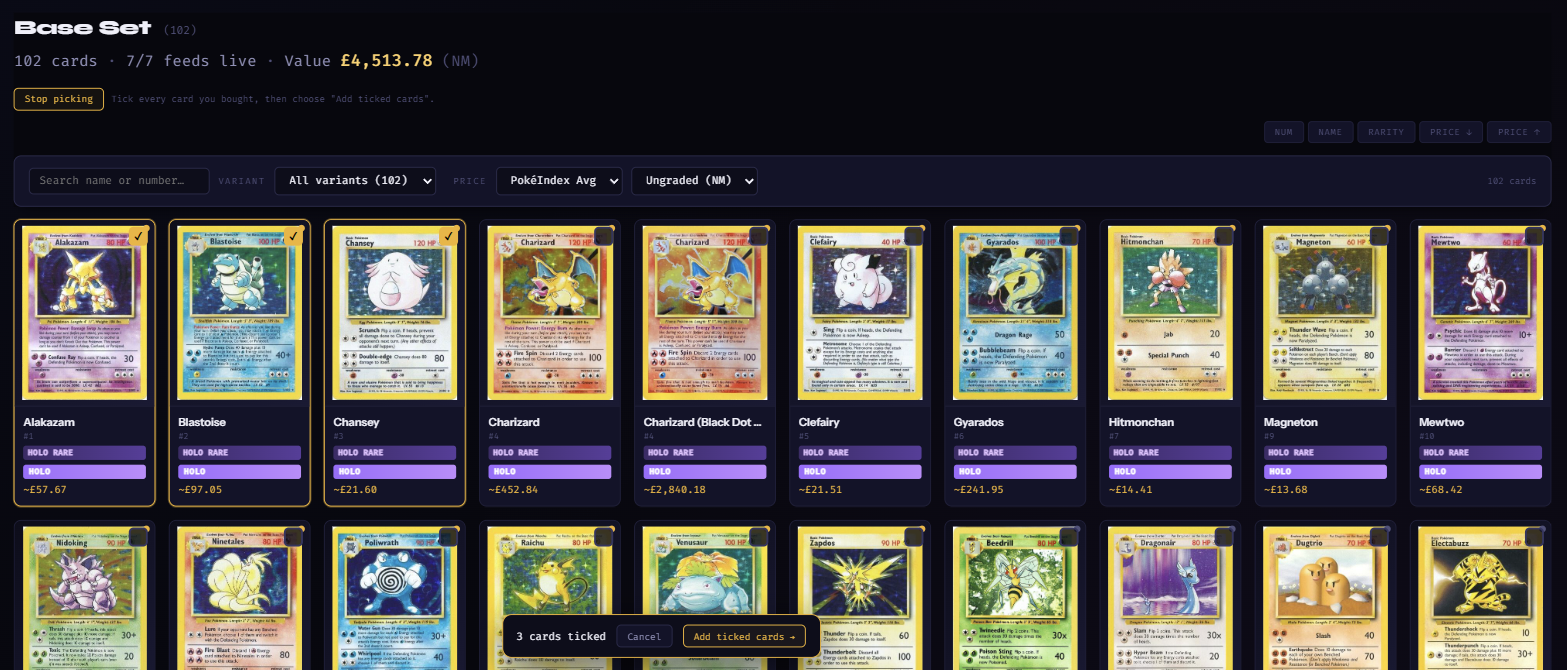
Picking mode on the Base Set page
The Base Set grid in picking mode: Alakazam, Blastoise and Chansey ticked with gold outlines, every other tile showing an empty tick box, and a bar at the bottom reading 3 cards ticked · Cancel · Add ticked cards
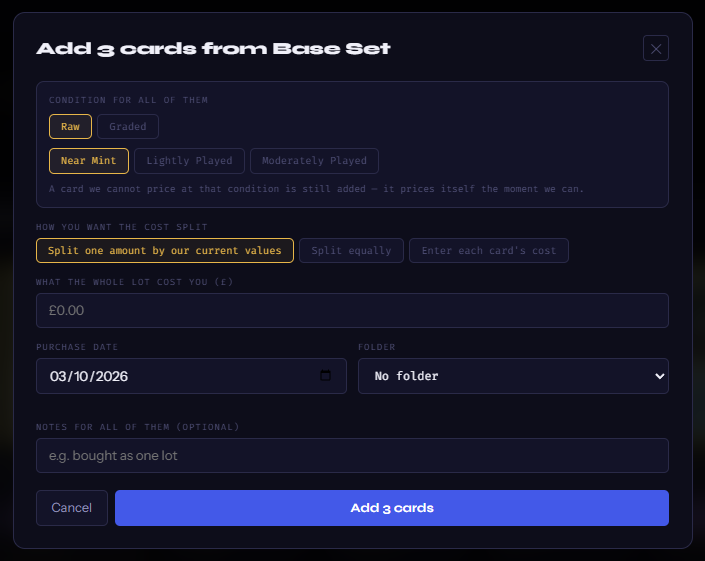
Add ticked cards
The Add 3 cards from Base Set box: Condition for all of them (Raw / Graded, Near Mint), How you want the cost split (Split one amount by our current values / Split equally / Enter each card's cost), What the whole lot cost you, Purchase date, Folder, Notes for all of them, and Add 3 cards
A
Condition for all of them. One condition for the batch; you can edit any card afterwards.
B
How you want the cost split. Bought as one lot? Split one amount by our current values shares what you paid across the cards in proportion to what each is worth. Split equally divides it evenly. Enter each card's cost gives you a box per card.
C
Date, folder, notes apply to all of them. Add N cards saves the lot. On Collector the bar tells you how many of your 25 are left before you tick more than you can add.
STEP 4

Importing a file (Investor)

Already keep your collection in a spreadsheet, or on PriceCharting, TCGplayer, Collectr or Pokellector? Press Import… on the Cards tab.
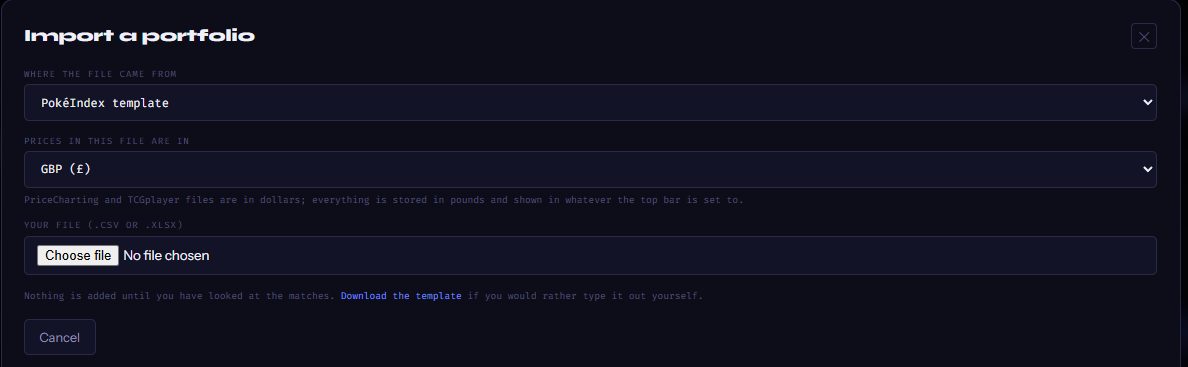
The Import box
The Import a portfolio box: Where the file came from (PokéIndex template), Prices in this file are in (GBP), the note that PriceCharting and TCGplayer files are in dollars, the file chooser, and the line Nothing is added until you have looked at the matches
A
Where the file came from. PokéIndex template (download it from the box and fill it in), PriceCharting, TCGplayer, Collectr, Pokellector, Any other file — detect the columns (we read each column by what's in it), or Map columns myself.
B
Prices in this file are in. The currency your file's figures are written in — PriceCharting and TCGplayer files are in dollars, so those pick USD by themselves. Everything is stored in pounds and shown in whatever the top bar is set to.
C
Your file (.csv or .xlsx). Nothing is added yet — the next screen shows what we read from every row and which of our cards it matched, with the confidence. Fix any row, tick the ones you want, and only then Add.
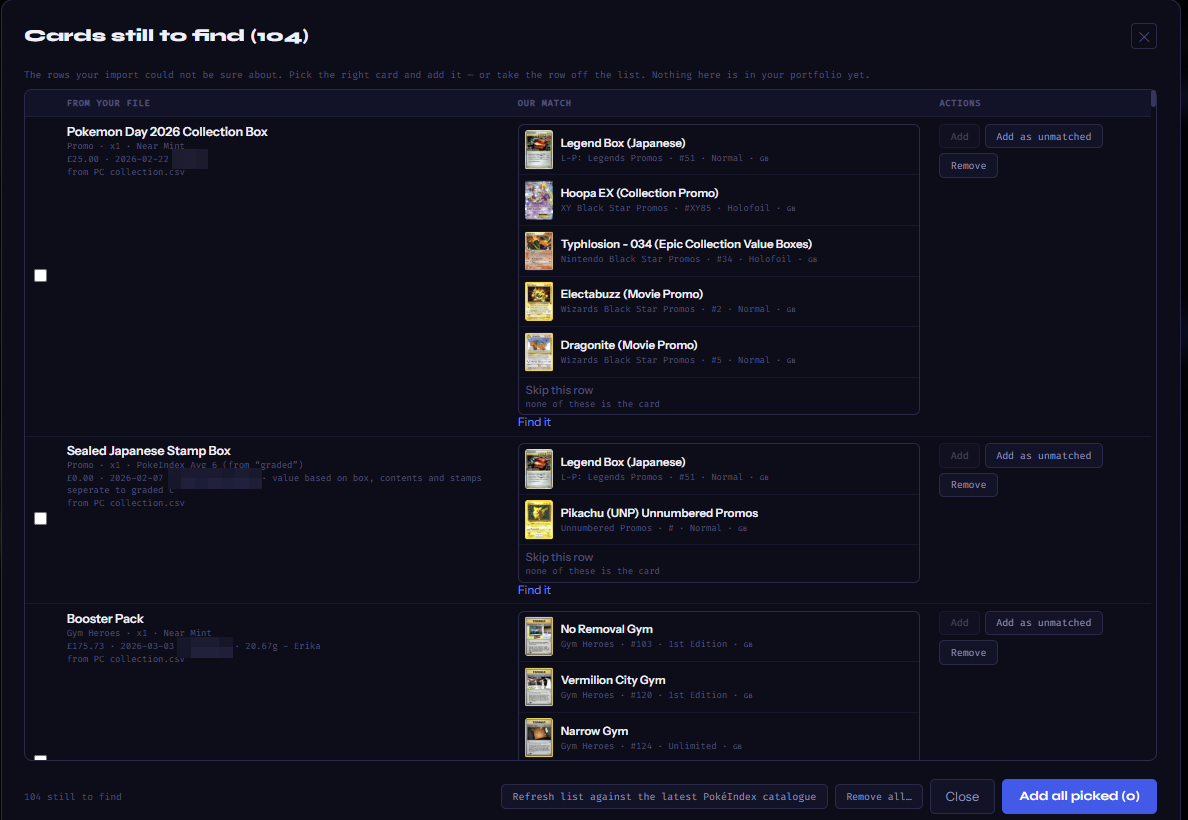
Cards still to find
The Cards still to find list: each row shows the line from your file on the left, our candidate matches with pictures in the middle, and Add / Add as unmatched / Remove on the right, with Skip this row and Find it links; the footer has Refresh list against the latest PokéIndex catalogue, Remove all, Close and Add all picked
D
Rows we couldn't be sure about wait here — nothing from this list is in your portfolio yet. Each row shows your file's wording on the left and our best guesses in the middle: pick the right card and press Add, or Find it to search the whole catalogue yourself.
E
Add as unmatched keeps a line we don't carry (a sealed box, an odd promo) at the value your file gave it, frozen. Remove drops the row.
F
Refresh list against the latest PokéIndex catalogue re-reads every waiting row against today's sets — new sets are added all the time, so rows that found nothing last month may match now. Add all picked adds every row you've chosen in one go. The "N cards from your import still to find" strip on the Dashboard and Cards tab brings you back here.
STEP 5

The Dashboard

The first tab. Everything on it is worked out from your active cards at last night's prices (the date is next to the title).
Overview
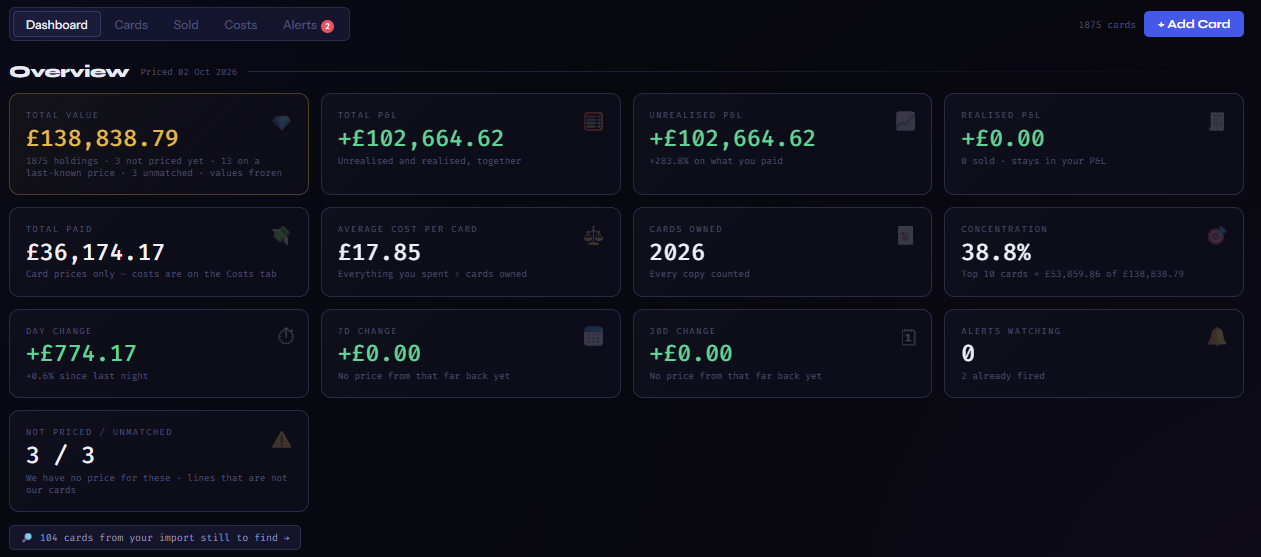
The Dashboard overview: the five tabs, the card count and + Add Card; then boxes for Total value, Total P&L, Unrealised P&L, Realised P&L, Total paid, Average cost per card, Cards owned, Concentration, Day change, 7D change, 30D change, Alerts watching and Not priced / unmatched, with the cards-still-to-find strip beneath
A
Total value — every active card at today's price. Total P&L — unrealised and realised together. Unrealised P&L — value now minus what you paid, with the % on what you paid. Realised P&L — profit from cards you've sold; it stays in your P&L for good.
B
Total paid · Average cost per card · Cards owned · Concentration (how much of your value sits in your top 10 cards). The Costs tab breaks the spending down.
C
Day / 7D / 30D change — how your value moved; the longer windows fill in as your history builds. Alerts watching and Not priced / unmatched — cards we have no price for yet, and lines that aren't our cards.
How it is moving
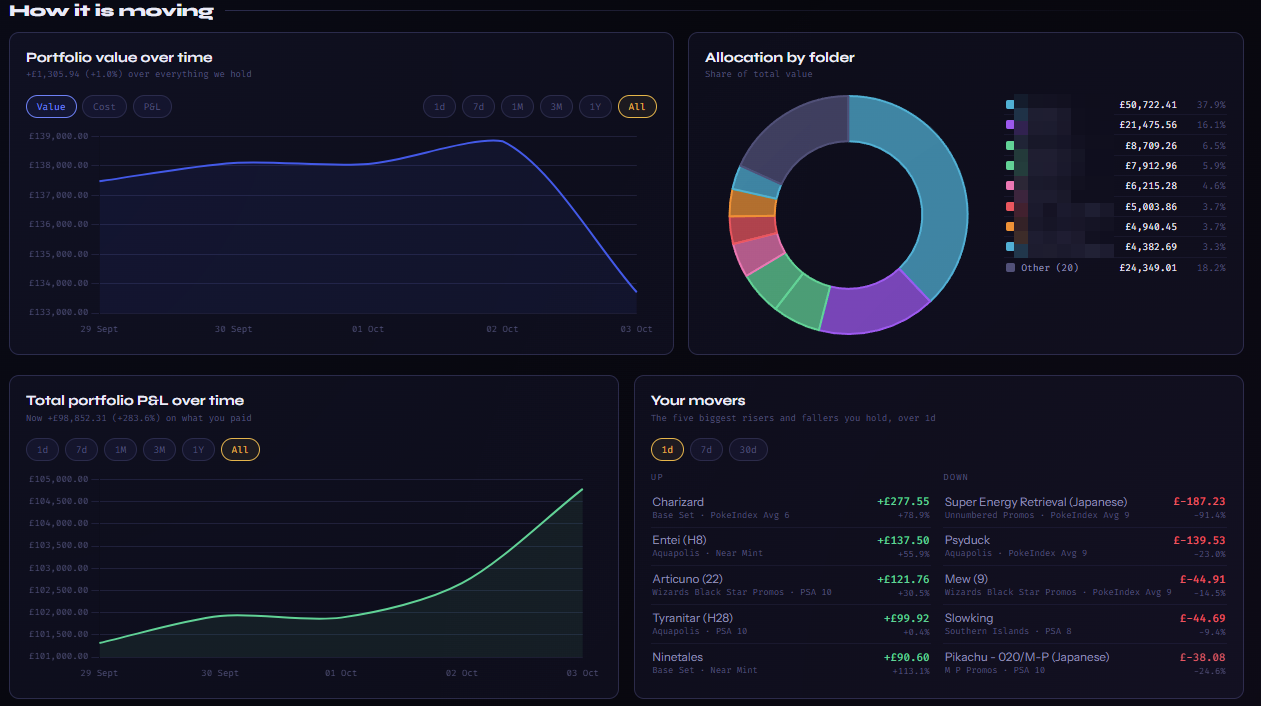
Portfolio value over time with Value / Cost / P&L lines and 1d to All range chips, Allocation by folder doughnut, Total portfolio P&L over time, and Your movers (up and down over 1d)
D
Portfolio value over time. Switch the line between Value, Cost and P&L; the chips pick the range (1d · 7d · 1M · 3M · 1Y · All). Allocation by folder — where the value sits (Investor folders). Total portfolio P&L over time and Your movers — your five biggest risers and fallers over 1d, 7d or 30d.
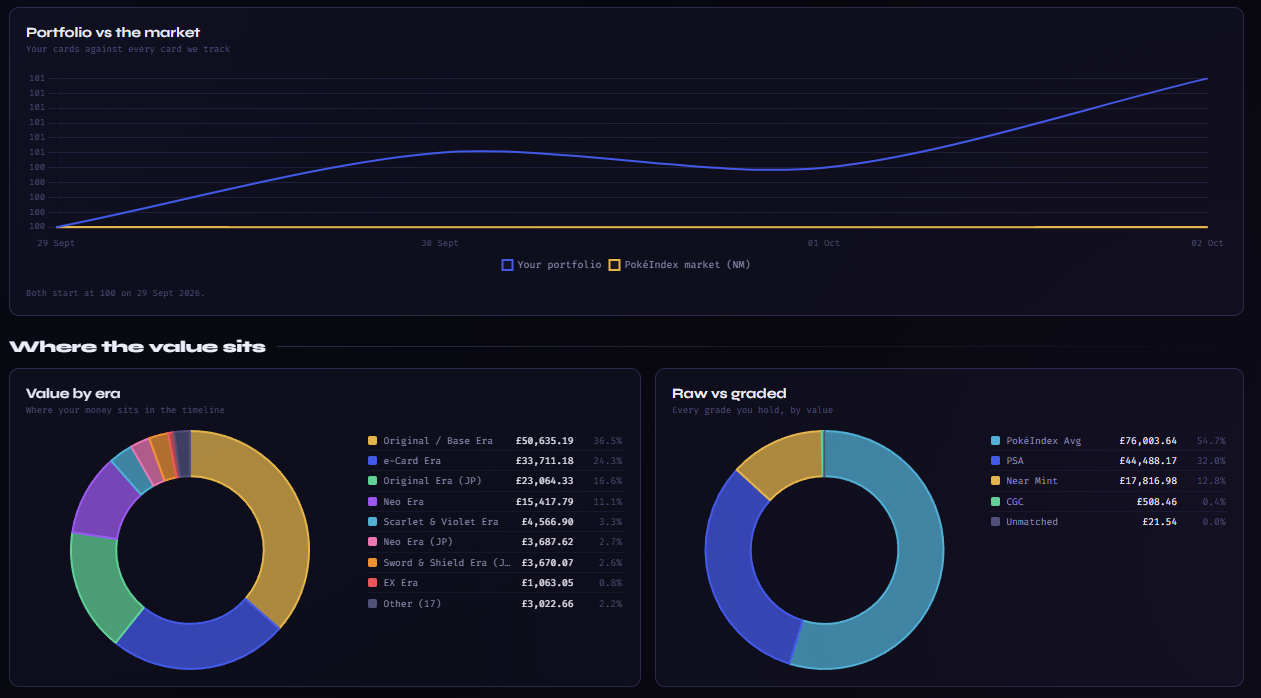
Portfolio vs the market · Where the value sits
Portfolio vs the market line chart with both starting at 100, then Value by era and Raw vs graded doughnuts
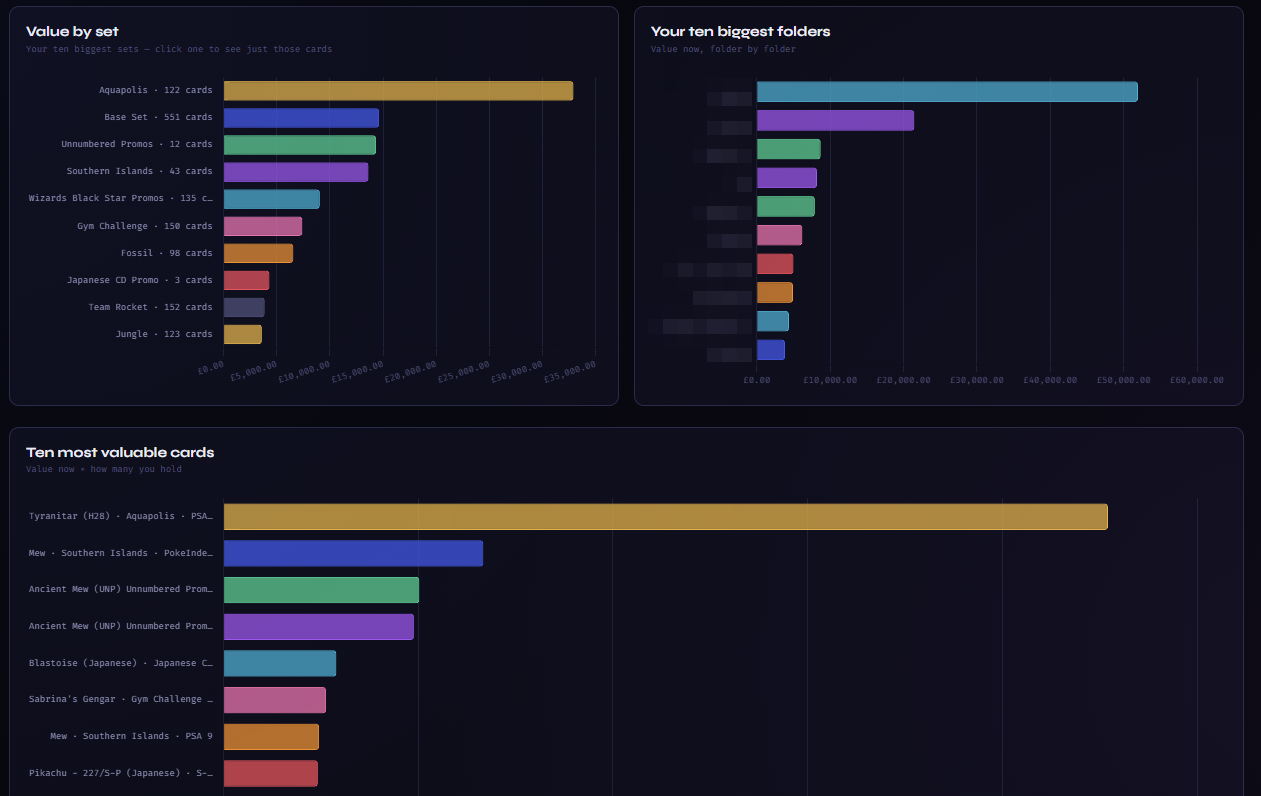
Value by set · biggest folders · most valuable cards
Bar charts: Value by set (click one to see just those cards), Your ten biggest folders, and Ten most valuable cards
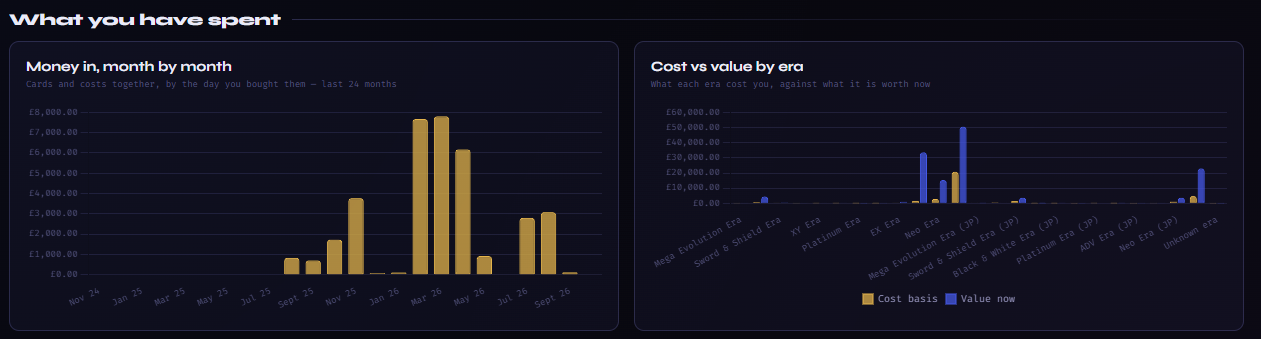
What you have spent
Money in, month by month bar chart over the last 24 months, and Cost vs value by era
E
Portfolio vs the market — your cards against every card we track, both starting at 100 on your first day: are you beating the market? Value by era and Raw vs graded — where your money sits in the timeline and across grades.
F
Value by set (click a bar to see just those cards), Your ten biggest folders, Ten most valuable cards.
G
Money in, month by month — what you spent, by the day you bought; Cost vs value by era — what each era cost you against what it's worth now; and P&L by folder under them, best to worst.
STEP 6

The Cards tab — every card, every number
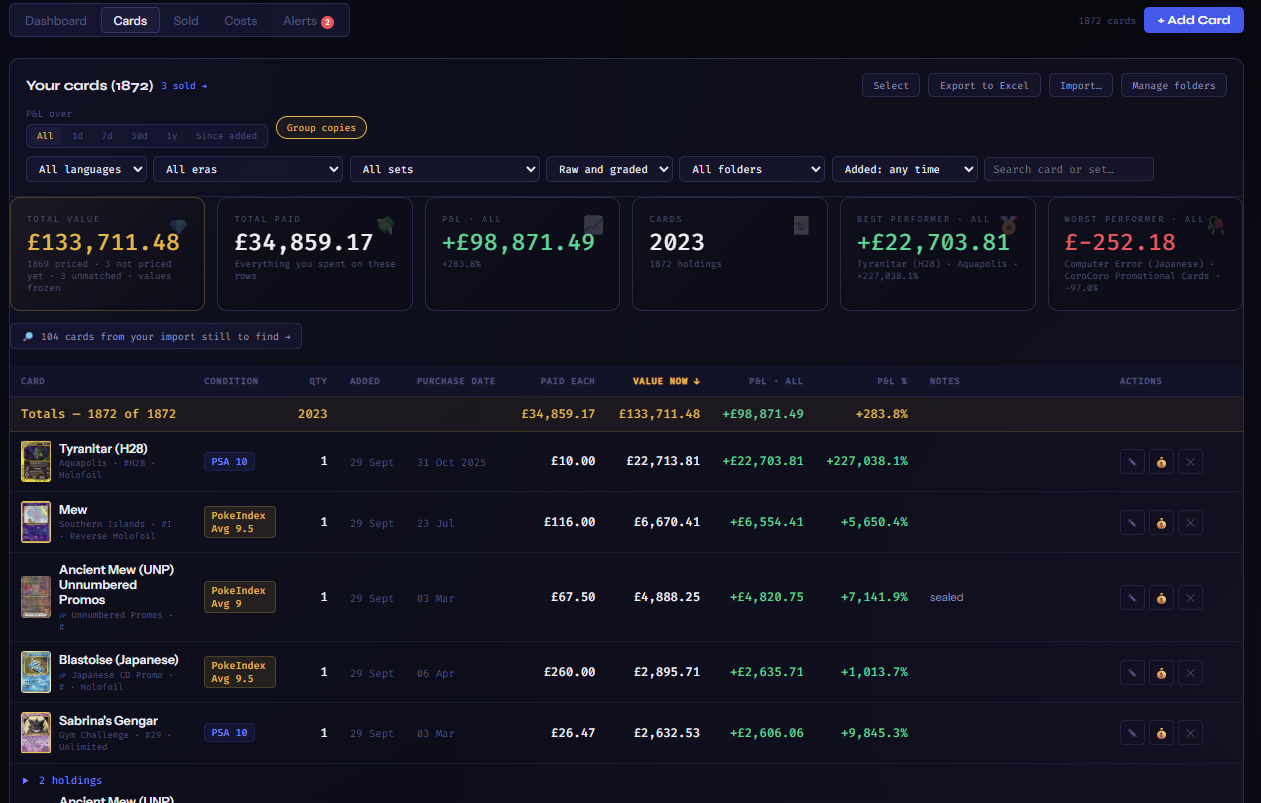
Your cards — sorted by Value now, most valuable first
The Cards tab: P&L over buttons (All, 1d, 7d, 30d, 1y, Since added) and Group copies; filters for language, era, set, raw and graded, folder, added date and a search box; boxes for Total value, Total paid, P&L, Cards, Best performer and Worst performer; then the table sorted by the Value now column with Card, Condition, Qty, Added, Purchase date, Paid each, Value now, P&L, P&L %, Notes and Actions columns, grouped holdings shown as 2 holdings rows
A
P&L over. All (the default) is value now minus what you paid — the real answer. 1d · 7d · 30d · 1y show the move over that window, and Since added from the day each card went in. Every P&L column, box and the Best / Worst performer follow the button.
B
Group copies folds several copies of the same card into one line (▸ 3 holdings) — open it to see each one. The filters narrow the table by language, era, set, raw / graded, folder or the date added, and the search box finds a card or set; the boxes and totals follow whatever is in view.
C
The table. Condition pill, quantity, the day it was added, purchase date, paid each, Value now (a ○ means an estimate, as everywhere on the site), P&L and P&L %, your notes. Click a column heading to sort by it — the picture is sorted by Value now, most valuable at the top (the ↓ on the heading); click it again to flip the order.
D
Actions. ✎ edit (change the condition, price, date, folder, notes — or Change the card itself), 💰 mark it sold (Step 7), ✕ remove it.
E
Select turns on tick boxes so you can sell, delete or move several cards to a folder in one go. Export to Excel (Investor) downloads everything — in the currency the top bar is set to. Import… is Step 4. Manage folders (Investor) renames or removes folders.
STEP 7

Selling a card — the Sold tab

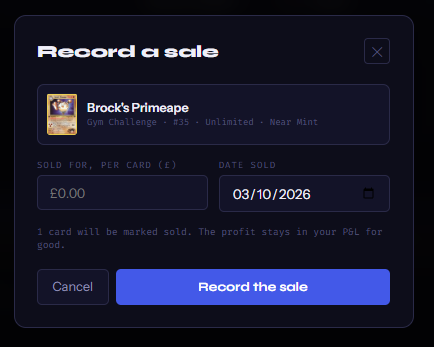
Record a sale
The Record a sale box for Brock's Primeape: Sold for, per card (£), Date sold, the note that 1 card will be marked sold and the profit stays in your P&L for good, Cancel and Record the sale
A
Press 💰 on a card, type what it sold for, per card and the date, and Record the sale. The money box is in the currency the top bar is set to — the symbol is on its label (£ here); switch the top bar to $ and you type dollars. The card moves to the Sold tab, and the profit (sale minus what it cost you, extras included) joins Realised P&L — for good.
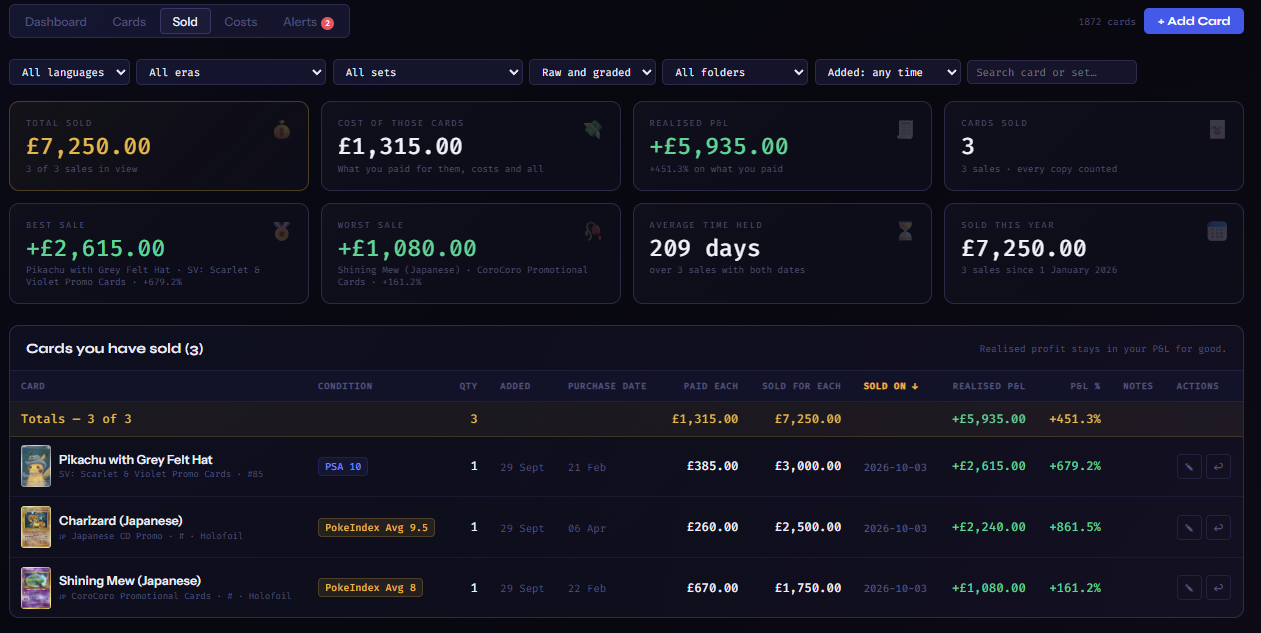
The Sold tab
The Sold tab: the same filters as the Cards tab; boxes for Total sold, Cost of those cards, Realised P&L, Cards sold, Best sale, Worst sale, Average time held and Sold this year; then the Cards you have sold table with Card, Condition, Qty, Added, Purchase date, Paid each, Sold for each, Sold on, Realised P&L, P&L %, Notes and Actions columns, each row ending in an edit pencil and a put-it-back arrow
B
The boxes. Total sold — every sale added up. Cost of those cards — what you paid for them, shipping and grading included. Realised P&L — the difference, with the % on what you paid. Cards sold counts every copy. Best sale and Worst sale name the card and its profit. Average time held — purchase date to sale date, over the sales that have both. Sold this year — since 1 January.
C
Filters and the table. The same language / era / set / raw-graded / folder / date filters and search box as the Cards tab — the boxes follow whatever is in view. Each row: condition, quantity, the day it was added, purchase date, Paid each, Sold for each, Sold on, Realised P&L and P&L %, your notes. Click a heading to sort — newest sale first by default.
D
✎ Edit this sale. Opens the same box with the price and date filled in — change either and Save the sale; your realised P&L updates to match. ↩ Put it back in the portfolio. Sold it by mistake, or the sale fell through? One press moves the card back to the Cards tab with everything it had — price paid, costs, date, folder, notes — and the sale comes out of your realised P&L. (On Collector it counts against your 25 again, so there has to be room.)
STEP 8

The Costs tab — what you've actually spent
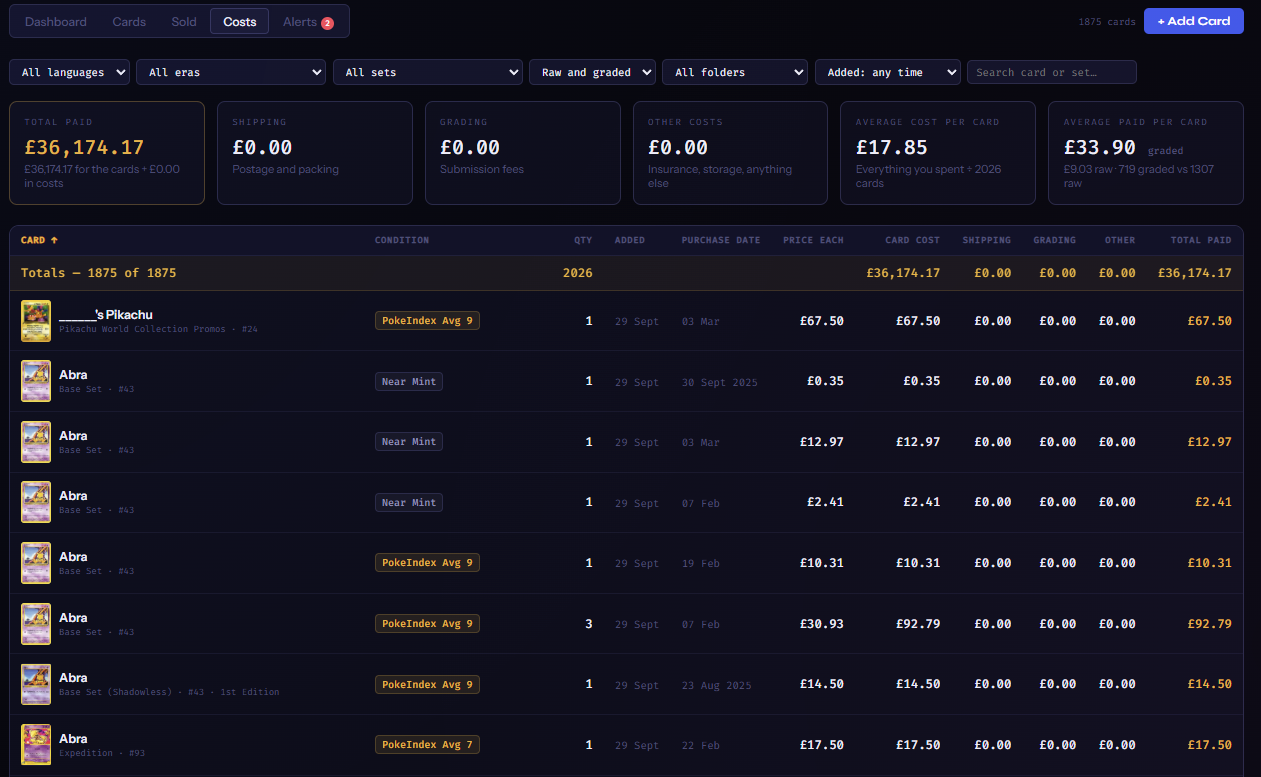
Costs
The Costs tab: the same filters as the Cards tab; boxes for Total paid, Shipping, Grading, Other costs, Average cost per card and Average paid per card (raw vs graded); then a table with Price each, Card cost, Shipping, Grading, Other and Total paid per card
A
Total paid splits into the cards themselves plus Shipping, Grading and Other costs — the extras you typed in the Add box. Average cost per card and Average paid per card (raw against graded) tell you what your habits cost.
B
The table shows every cost line per card, with the same filters and sorting as the Cards tab.
STEP 9

Price alerts

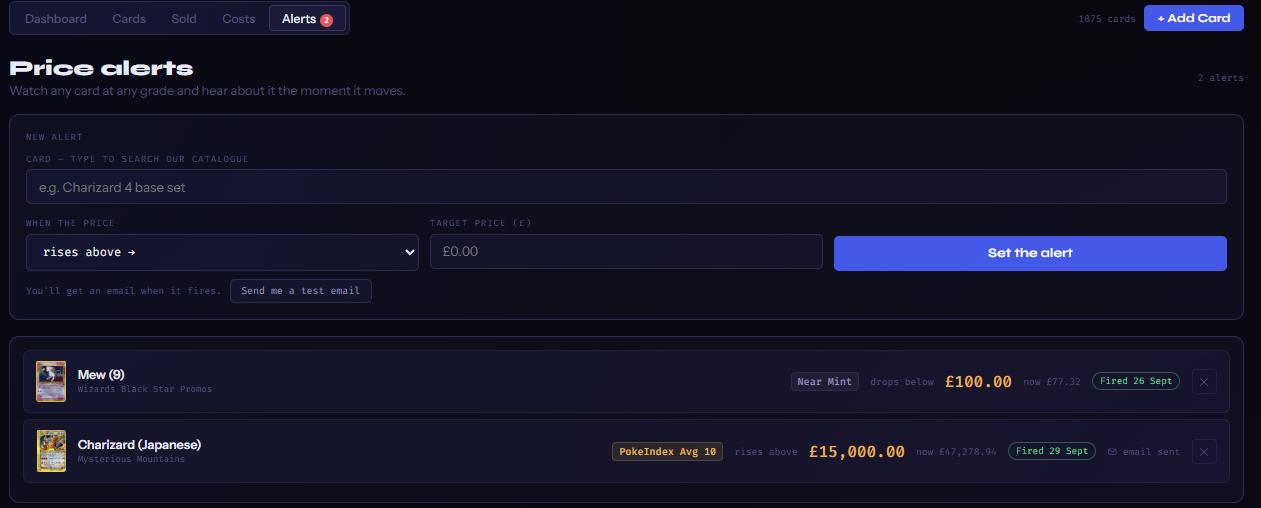
Alerts
The Alerts tab: a New alert form with a card search box, a rises above / drops below choice, a target price box and Set the alert, plus Send me a test email; below it two alerts — Mew (9) Near Mint drops below £100 (Fired 26 Sept) and Charizard (Japanese) PokéIndex Avg 10 rises above £15,000 (Fired 29 Sept · email sent)
A
New alert. Search for any card in our catalogue (it doesn't have to be one you own), choose the grade to watch (Raw, or a grader and grade), rises above or drops below, the target price — in your currency — and Set the alert.
B
What happens. Every night, after prices update, each alert is checked. The first night the price crosses your target it fires and you get an email — once, not every night; it arms itself again only if the price crosses back. Send me a test email proves the emails reach you.
C
The list. Each alert shows its grade pill, direction, target, the price now, when it fired and whether the email went. ✕ removes it. Collector keeps 10 alerts; Investor is unlimited.
STEP 10

Money, currency and plans — the rules worth knowing

•
Your currency, everywhere. The top-bar picker changes what you see and what you type: a price typed with the bar on $ is a dollar price. Everything is stored in pounds underneath, so switching the bar never changes what a card cost you. Exports and alert emails follow the currency too.
•
○ means estimate. A card with no live raw sale is valued from its graded sales, marked ○ — the same rule as the tiles and card pages, so your portfolio never disagrees with the site.
•
Collector's 25. Over the cap after a downgrade? Your 25 most valuable cards stay active; the rest are parked — listed greyed out with no price, out of the totals, never deleted. Upgrading brings every card back exactly as it was.
•
Private. Your portfolio is yours alone — never shown to other visitors, never used anywhere else on the site.
📰 News / Blog / Market Commentary
Pokémon TCG news in plain English, monthly deep-dives for collectors, and the monthly market report — downloadable as a PDF.
Loading…
🟢 System Status
Live status of every data source and service powering PokéIndex.
Checking services…
🚀 Coming Soon
What we are building next for PokéIndex. Want one sooner, or have an idea? Tell us.
📊
Population reports
How many copies of each card every grading company has graded, at every grade — so you can see how rare a PSA 10 really is next to its price.
Planned
🧩
Error cards
Misprints, miscuts, missing holos, wrong backs and the other production errors collectors chase — catalogued with their own price history.
Planned
🃏
Other Pokémon cards
Beyond the trading card game: Topps, Bandai Carddass, vending, stickers and the other Pokémon card families with real secondary markets.
Planned
🌌
Other TCG universes
The same price index, graded ladders and market tools for other trading card games — the first ones will be chosen with you.
Exploring
🔨
Upcoming auction lots
On every card page: the lots for that card open right now at the auction houses we already track — Catawiki first, then the rest — next to the live eBay listings, so you can see what's about to sell as well as what has sold.
Planned
📦
Sealed products
Booster boxes, elite trainer boxes, tins, collection boxes and packs, priced the same way as singles from sold listings and auction results.
Planned
🔔
Price alerts by email
Live now — set a target on any card and grade from the Alerts tab in My Portfolio and be emailed the night the market crosses it. See how in the Portfolio guide →
Built
📁
Portfolio import & export
Live now — import a spreadsheet, PriceCharting, TCGplayer, Collectr or Pokellector file from the Cards tab, and export everything with today's values and profit & loss in your currency. See how in the Portfolio guide →
Built
Order and timing may change. Investor members get early access to new features as they land.
Simple, Honest Pricing
Browse every card for free. Upgrade when you want the full market picture.
Monthly
Annual Save 25%
Free
£0/mo
A free account. Free forever — no card needed.

  • ✓3 full card pages a month — see everything Investor sees (free account)
  • ✓Every set and card — English + Japanese
  • ✓Smart search across the whole catalogue
  • ✓Near Mint prices on every tile and card page
  • ✓Live eBay listings on every card page
  • ✓Price ticker · Market Index · Price Index · Market Pulse · Set Value
  • ✓Top 3 price movers and top 3 most valuable cards
  • ✓7-day and 30-day price charts (Near Mint)
  • ✓News, blog + monthly Market Commentary
  • ✓Charizard 1st Edition (Base Set Shadowless) — the full card page, free for everyone
  • ✗Graded prices (PSA, BGS, CGC…)
  • ✗Auction sale prices and history
  • ✗Portfolio
  • ✗Price alerts
Collector
£11.24/mo
Billed £134.88 a year — you save £45

  • ✓Everything in Free
  • ✓Graded prices — PSA, BGS and CGC, whole grades 1–10, on tiles and card pages
  • ✓PokéIndex Average by grade
  • ✓Latest auction sale for every card
  • ✓Price charts to 1 year — Near Mint, PSA, BGS and CGC
  • ✓Price movers and most valuable cards — top 5
  • ✓Portfolio: 25 cards with profit & loss
  • ✓10 price alerts
  • ✓No ads
  • ✗SGC, TAG, ACE and AGS + half grades (9.5, 8.5)
  • ✗Full auction history, 5-year charts, Grading ROI + full Market Stats
API
£200/mo
For businesses, apps and shops. By request.

  • ✓The PokéIndex Average as data — our blended global price for every card
  • ✓Near Mint and every grade
  • ✓Every set — English + Japanese
  • ✓Price history, updated daily
  • ✓Your own API key and daily allowance
  • ✓Commercial-use licence
  • ✓Direct support
We reply within 24 hours
✓ Cancel anytime✓ Prices in GBP✓ Secure checkout✓ Annual plans save 25%
Have an invite code?
Enter it here for complimentary Investor access.
By continuing you agree to our Terms and Privacy Policy.
Privacy Policy
Last updated: 4 October 2026

PokéIndex (pokeindex.app) is a price guide for Pokémon trading cards. This page explains what we collect, why, and what you can do about it. The short version: we keep the minimum needed to run your account, we never see your card number, and we don't sell or share your details.

Who we are

PokéIndex is operated from the United Kingdom. Contact us through the form at pokeindex.app/contact.

What we collect and why

If you only browse: nothing that identifies you. Our servers see your internet address and the pages you request, which we use for security (rate limits, bot protection) and to keep the site working. Addresses are masked in our logs.

If you create an account: your email address, your name if you give one, and a sign-in method (password, or Google / Apple sign-in). Sign-in is handled by Clerk, a specialist provider; passwords are stored by Clerk, never by us. We keep an account id, your email, your plan, and a count of the free card pages you have opened this month.

If you subscribe: payments are taken by Stripe. Stripe collects your card details directly — we never see or store your card number. We receive from Stripe only what we need to run your plan: whether a payment succeeded, your subscription status and dates, and the last four digits of the card for your receipts page.

If you use the portfolio: the cards, quantities, costs, folders, sold records and price alerts you enter. They are stored on our servers so they follow you between devices. We use them only to show you your own portfolio and to send the alerts you set.

If you contact us: your name, email address and message, so we can reply. Messages are sent to our inbox through Resend (an email provider).

Security records: to stop login sharing we keep a short record of the devices signed into an account (a session id, when it was last seen, and the country it connected from) for up to 7 days, in memory only. To stop automated scraping we count how often an account opens card pages over ten minutes. Neither record is used for anything else.

Cookies and similar

  • A sign-in cookie set by Clerk, so you stay logged in.
  • Settings saved in your own browser (currency, tab choices, dismissed notices). These never leave your device.
  • Cloudflare's security cookies, used to tell humans from bots.
  • Advertising cookies set by Google for visitors who are not signed in or are on the Free plan; paying members never see adverts. Google's use of cookies is described at policies.google.com/technologies/ads.

Where the law requires your consent for advertising cookies, Google's own consent message is shown to you on your first visit, and your choice is recorded and respected there.

We do not use analytics trackers or social-media pixels.

Who else sees your data

Only the providers we need to run the service, each bound by their own privacy terms and acting on our instructions: Clerk (sign-in), Stripe (payments), Resend (email), Cloudflare (website hosting and security), Railway (our server) and Google (advertising, for visitors who are not paying members). We do not sell, rent or trade personal data.

Where it is kept

Our providers operate from the United Kingdom, the European Union and the United States. Where data leaves the UK, it is covered by the providers' standard data-protection terms.

How long we keep it

Your account and portfolio for as long as you have an account. Contact messages for up to 12 months. Security records for days, not months. If you delete your account, your account record and portfolio are removed from our server and your Stripe subscription is cancelled; Stripe keeps payment records as the law requires it to.

Your rights

Under UK data-protection law you can ask to see the data we hold about you, have it corrected, have it deleted, or object to how we use it. You can delete your account yourself from your account menu. For anything else, use the contact form; we answer within a month. If you are unhappy with our answer you can complain to the Information Commissioner's Office (ico.org.uk).

Children

PokéIndex is not directed at children. You must be at least 16 to create an account.

Changes

If this policy changes in a way that matters, we will say so on this page and, for account holders, by email.

Read our Terms of Service →

Terms of Service
Last updated: 4 October 2026

Please read these terms before using PokéIndex. By using the site or creating an account you agree to them.

1. What PokéIndex is

PokéIndex is a price guide for Pokémon trading cards. We collect recorded sales from marketplaces and auction houses, combine them with our own estimates, and show prices, charts, a market index and tools such as the portfolio tracker.

2. Prices are information, not advice

Every figure on PokéIndex is either a recorded sale or an estimate derived from recorded sales. Estimates are marked. Prices move, sources make mistakes, and a card you own may sell for more or less than any figure we show. Nothing on PokéIndex is financial, investment or valuation advice, and you should not rely on it as the only basis for buying, selling or insuring cards.

3. Your account

One account per person. You are responsible for keeping your sign-in details private. Accounts are personal and may not be shared: our systems allow two signed-in devices per account and sign out the oldest when a third appears. You must be at least 16 to hold an account.

4. Plans, payment and cancellation

  • Free, Collector and Investor plans are described on the Pricing page; what each includes may change, but not for the period you have already paid for.
  • Paid plans are billed by Stripe monthly or yearly in advance, in pounds sterling, and renew automatically until cancelled.
  • The Investor trial is free for 7 days; if you do not cancel before it ends, the first payment is taken.
  • Cancel any time from your account menu. Cancelling stops the next payment; you keep access until the end of the period you have paid for.
  • Money back: if this is your first payment to us and you ask within 14 days, we refund it in full. After that, payments are not refundable except where the law says otherwise.
  • Prices include VAT where it applies. If we change a price, we tell you by email at least 30 days before it affects you.
  • An invite code gives complimentary access for a set period. It can be used once, it is not transferable, it has no cash value, and it ends on its date unless you choose to subscribe.

5. Fair use

You may use PokéIndex for your own personal or in-house business purposes. You may not:

  • access the site with scripts, bots, scrapers or any automated tool, or at a speed no person could read (our systems slow down and may suspend accounts that do);
  • copy, republish, sell or redistribute our prices, charts, index values or other content, or build a product or dataset from them;
  • share, resell or transfer an account, or get around the limits of a plan;
  • interfere with the site, our servers or other users.

6. Ownership

The PokéIndex name, the site, its design, text, charts, the market index and our price estimates belong to us. Pokémon, Pokémon character names and card images are trade marks and copyright of their respective owners and are shown only to identify the cards being priced. PokéIndex is an independent price guide and is not affiliated with, endorsed or sponsored by Nintendo, The Pokémon Company, GAME FREAK or Creatures Inc.

7. Your content

What you enter into the portfolio stays yours. You give us permission to store and process it to provide the service. We do not publish it.

8. Availability

We aim for the site to be available all the time, but we do not promise it. Prices and features may change, pause or be withdrawn, and we may suspend or close an account that breaks these terms (with a refund of any unused paid period unless the breach is serious).

9. Our liability

We provide PokéIndex with reasonable care but, to the extent the law allows, we are not liable for losses from relying on a price, for business losses, or for losses we could not reasonably have foreseen. For paying members, our total liability for any claim is limited to the fees you paid us in the 12 months before the claim. Nothing in these terms limits liability that cannot be limited by law.

10. Changes to these terms

If we change these terms in a way that affects you, we will say so on this page and email account holders at least 14 days before the change takes effect. Continuing to use the site after that date means you accept the new terms.

11. Law

These terms are governed by the law of England and Wales, and the courts of England and Wales have jurisdiction, without taking away any rights you have as a consumer where you live.

12. Contact

Through the contact form at pokeindex.app/contact.

Read our Privacy Policy →

Get in Touch
Questions, feedback, partnership enquiries — we read every message.
💬
General Enquiries
Questions about PokéIndex, your account, or data
Write to us ↓
🤝
Partnerships & Data
Auction houses, data providers, API access
Write to us ↓
Send us a message
We aim to reply within 24 hours
Follow PokéIndex
Daily chart snapshots, the week's biggest auction sales and monthly market commentary — on the platforms you already use.
Get the app
PokéIndex installs from your browser in two taps — no app store needed. It opens full-screen with its own icon, prices live.
Android: Chrome asks to install. iPhone: Share → Add to Home Screen. Desktop Chrome / Edge: the install icon at the right of the address bar.
Card Details
Fetching live prices…
📈 Price History
Period: Source: Grade:
🛒 eBay Live Listings